


Curated, reusable desktop defaults for the HorneroOS workstation family (Desktop, Studio, Gaming): compositor, terminal, GTK, Qt, fonts, and common desktop applications — plus the Hornero Signal token schema, theme packs, brand assets, and the helper libraries that apply them. Extracted (never moved) from the generic parts of ulises-jeremias/dotfiles.
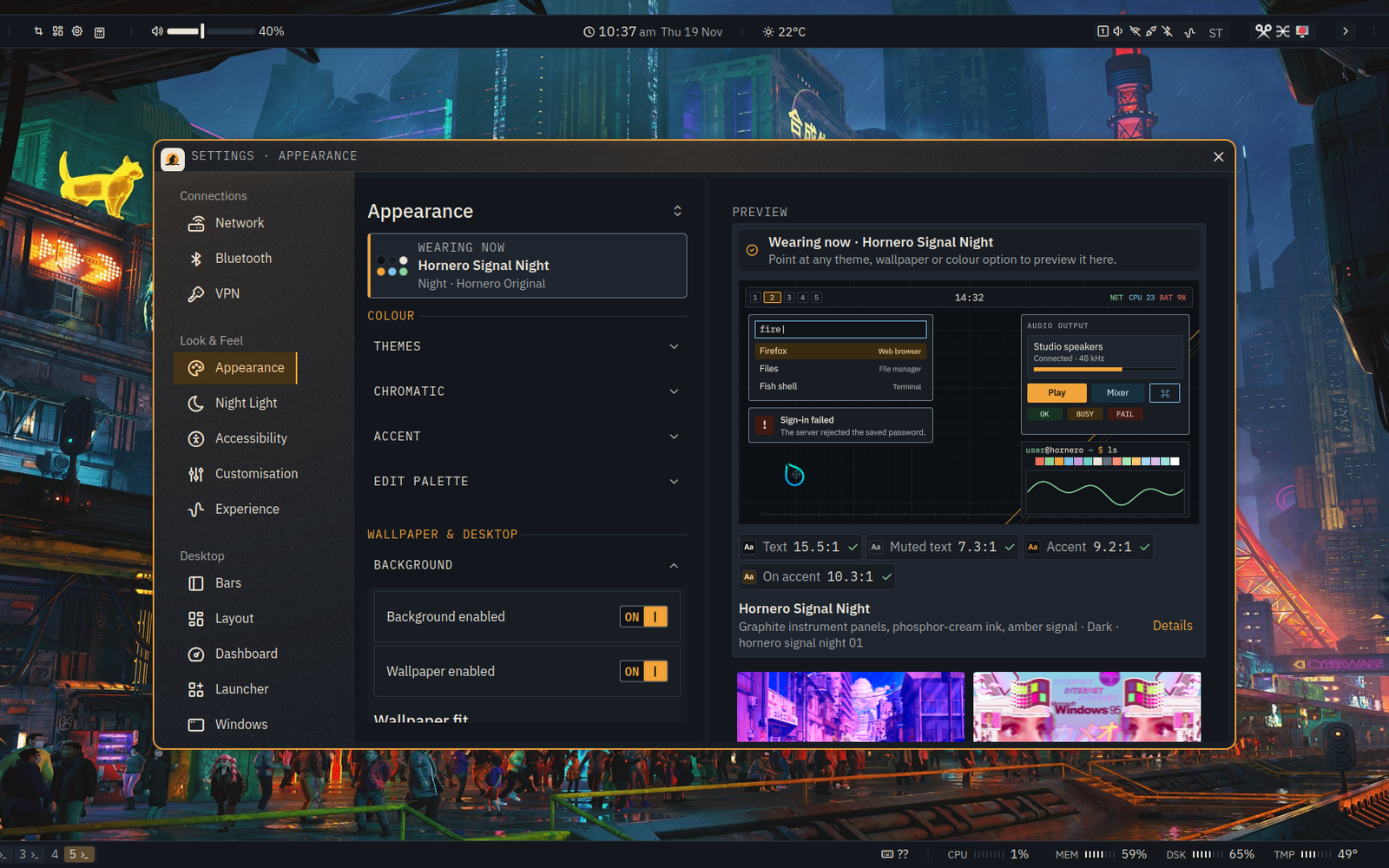
Every setting in one Control Center — Appearance wearing Signal
Night. Real capture — maintainer machine, staged demo content; shown
values are that machine's, not requirements.
See also: HorneroOS/shell · HorneroOS/hornero · Website · Docs · Themes · Layouts
Generic product defaults that define the Hornero desktop out of the box.
Everything here must be safe for every machine: no usernames, no emails, no
host-specific outputs, no secrets. scripts/guard-personal-data.sh enforces
that in CI.
- Personal configuration. Anything specific to one person's workstation
stays in the dotfiles repo. Rule of thumb: if a file needs a name, an
email, a hostname, a monitor model, or a
/home/<someone>path to make sense, it does not belong here. - The desktop shell. The Quickshell/QML shell lives in HorneroOS/shell; this repo only holds the configuration that shell (and the compositor underneath it) consumes.
- Distribution composition. Releases, manifests, packaging live in HorneroOS/hornero.
- Shell boundary heuristic.
shell/currently holds only a stub note: the interactive-shell layer (zsh, prompts, aliases) is personal enough to need its own curation pass before anything lands here. Until that pass, shell defaults are out of scope — seedocs/DECISIONS.md.
HorneroOS Desktop is Wayland-first. Hyprland remains the supported session.
Niri 26.04 has a passing single-output Hornero QA baseline covering Shell
startup, workspace/window state and switching, Launcher, a theme change
(Hornero Light, recorded before Hornero Signal), package wallpaper
discovery, Appearance, Layout Picker, lock/unlock, screencast portal presence, and screenshot capture. Niri remains experimental
while multiple outputs, HiDPI, actual OBS capture, notifications, recovery,
and the broader Shell surface matrix are validated. The defaults include
Niri's upstream 26.04 configuration, Hornero Shell startup, Hornero shortcuts,
native screenshot selection, and the compositor-specific
/etc/niri/config.kdl package fallback. This does not claim full feature
parity: Niri currently has no special workspaces, Hyprland-native window
previews, or Hyprland window geometry picker. See
docs/NIRI.md and the Shell's
docs/COMPOSITORS.md.
Curated from generic dotfiles material: Hyprland, Niri, Kitty, Alacritty,
Ghostty, GTK 2/3, Qt6ct, fontconfig, fastfetch, btop, cava, Thunar, CopyQ,
handlr, git-minus-identity, 20 Hornero Signal theme packs (schema v2: the
Signal Night/Day/High Contrast flagships, nine Hornero Originals and eight
community ports), lib/hornero
implementation libraries and the hornero-gtk-theme-family CLI adapters.
See docs/DECISIONS.md for the full copied / excluded-as-personal /
deferred accounting.
Kitty remains the default terminal selected by Exo. Alacritty and Ghostty
receive optional Hornero configurations. Every native theme (GTK 3/4,
libadwaita, Qt6ct, Kitty, Alacritty, Ghostty, btop, Cava, Hyprland borders,
hyprlock) is generated from the applied theme's Hornero Signal roles
(profiles/themes/tokens.schema.json, schema v2), so terminal work, system
monitoring, and audio visualization share the active desktop look.
Wallpapers never recolour the UI. Factory default: Hornero Signal Night in
the Cockpit layout, set in IBM Plex (ttf-ibm-plex, a hard package
dependency alongside bash, git, polkit-gnome and python).
Optional non-terminal palette integrations are recorded
in profiles/factory.json and validated against their packaged configuration
and renderer outputs.
The btop default refreshes at the upstream-recommended 2-second interval to
avoid the 100 ms polling cost of its inherited workstation setting.
desktop/    per-application defaults      -> ~/.config/<app>, ~/.gtkrc-2.0
xdg/        git (no identity) + handlr    -> ~/.config/git, ~/.config/handlr
profiles/   base desktop profile + 20 theme packs -> ~/.local/share/hornero/…
shell/      stub note (interactive shell deferred)
lib/hornero/   appearance/GTK/wallpaper implementation libs -> ~/.local/lib/hornero
bin/        hornero-gtk-theme-family CLIs    -> ~/.local/bin
scripts/    materialize.sh, validate.sh, guard-personal-data.sh
tests/      temp-HOME materialization test
docs/       DECISIONS.md (per-item provenance)
Preview what an install would do:
scripts/materialize.sh --dry-runInstall into the current user (XDG-aware):
scripts/materialize.shInstall into an isolated directory (hermetic — XDG variables ignored):
scripts/materialize.sh --dest /tmp/hornero-homeValidate everything without writing to any HOME:
scripts/validate.shWhen Kitty is installed, validate all shipped Kitty files with Kitty's own parser (the normal CI job runs this against the current Arch package):
scripts/validate-kitty-config.shWhen Ghostty is installed, validate its shipped config and Hornero fallback
theme with Ghostty's parser. scripts/validate.sh runs this automatically;
the dedicated command is useful when changing terminal defaults:
scripts/validate-ghostty-config.shFactory GTK settings are generated from profiles/factory.json and its
default theme recipe. After changing that contract, regenerate the static
settings copied into GTK 3 and GTK 4 config directories:
scripts/generate-gtk-settings.py
scripts/generate-gtk-settings.py --check
Run the temp-HOME materialization test:
tests/test_materialize.shAfter install, identity overlay (the one thing this repo refuses to ship):
git config --file ~/.config/git/config.user user.name "Your Name"
git config --file ~/.config/git/config.user user.email "you@example.com"
Apply a theme (writes the live Signal scheme and every native theme):
export PATH="$HOME/.local/bin:$PATH"
hornero-appearance theme apply hornero-signal-dayEvery curated file traces to ulises-jeremias/dotfiles@b26db04; per-file
decisions live in docs/DECISIONS.md. Upstream is read-only to this project:
we copy, we never move, and we never push there.
MIT.