🌐 Languages: English | Русский | ไทย | 简体中文 | Español | العربية
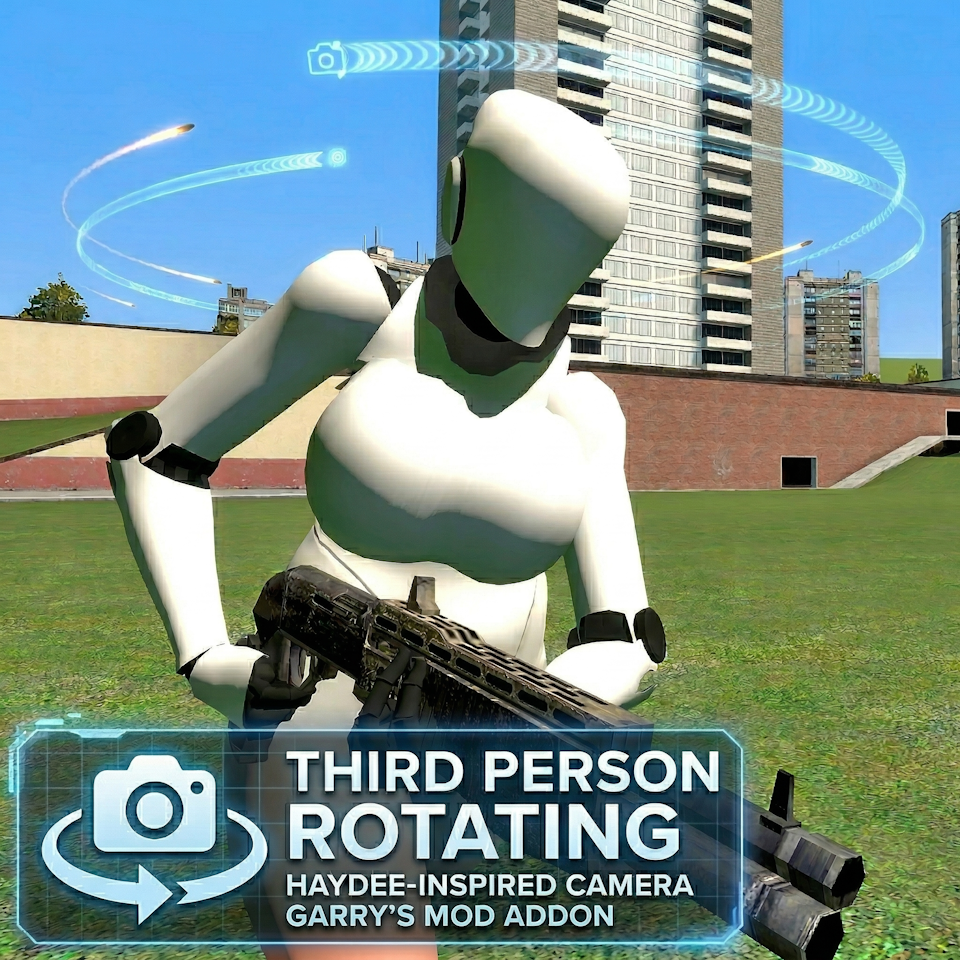
A highly customizable over-the-shoulder camera for Garry's Mod, inspired by Haydee.


The Third Person Rotating Camera is a Garry's Mod addon that completely overhauls the game's default third-person perspective. Designed identically after the camera mechanics from the game Haydee, this mod aims to deliver a precise, responsive, and highly customizable over-the-shoulder camera system.
Whether you're engaging in sandbox play or exploring maps, this addon offers unparalleled control over your viewing angles to maximize your gameplay experience.
- True Aim-to-Look Mechanics: Your player model dynamically adjusts and looks exactly where you are aiming.
- Aiming Rotation Smoothness: Configure exactly how smoothly your character turns their body to meet the camera when aiming weapon mechanics.
- Precise Multiplayer Prediction: No more rubberbanding or "auto-walking"! The movement is perfectly synced and calculated relative to the camera's angle.
- Hybrid Mode (Smart Scope): Play alongside weapon bases like TFA or CW 2.0 without conflict. The camera seamlessly auto-transitions to first-person when you try to aim.
- Classic Movement Mode: Prefer standard Garry's Mod controls? Enable the Classic mode setting to lock your player model to the camera direction while retaining the over-the-shoulder view.
- Toggle Aim: Prefer not to hold the aim button? Enable Toggle Aim in the settings for single-click aiming.
- Invert Y-Axis Support: Built-in axis inversion for players who prefer traditional flight-stick style pitch control.
- Camera Sensitivity: Tune your over-the-shoulder look speed with a dedicated multiplier setting to compensate for the third-person parallax effect.
- Shoulder Switching: Quickly swap your camera from the right shoulder to the left shoulder with a single command.
- Dynamic Crosshair Tracing: Enable the true trajectory crosshair to see exactly where your bullets will land in 3D space. Fully customizable with RGBA color and size settings!
- Crouch Camera Drop: Maintain complete control when crouching! Customize exactly how much the camera lowers to keep your view unobstructed in tight spaces.
- Cinematic Camera Transition: Enjoy a smooth, interpolated camera flight when switching between first-person and third-person views. Customize the transition speed!
- Extensive Customization: Manage your camera's X, Y, and Z offsets, FOV, and speeds seamlessly via the Garry's Mod Context Menu.
- Full Localization Support (31 Languages): Enjoy high-quality native UI translations and context-aware help tooltips for every setting.
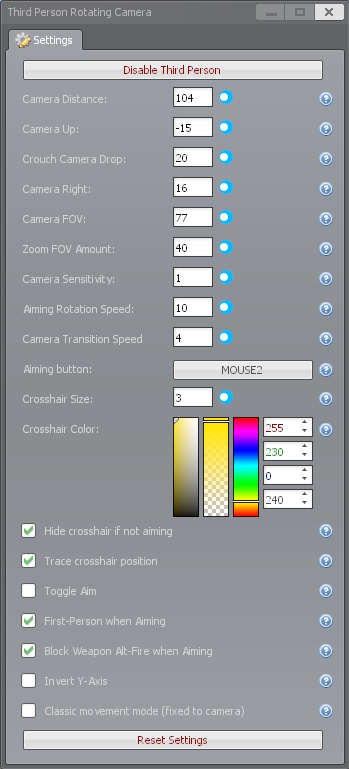
Customize the camera in real-time without typing any commands!
- Hold
Cto open the Garry's Mod Context Menu. - Click on the Third Person Rotating Camera icon (usually located on the top bar or under a dedicated tab).
- Adjust the sliders for Camera Distance, Up/Down, Right/Left, and FOV.
- Set your preferred Aiming button (default is Right Mouse Button).
- Enable or disable new features like Toggle Aim, Hybrid Mode (Smart Scope), and Invert Y-Axis directly via checkboxes.
You can bind useful functions directly in the developer console (~):
# Toggle the third-person camera ON and OFF with a single key (e.g., 'X')
bind x "rtp_toggle"

# Quickly swap shoulders (moves camera from right to left, or vice versa)
bind v "rtp_switch_shoulder"For server owners or power users, all variables can be configured via the console.
| ConVar | Description | Default |
|---|---|---|
rtp_enabled |
Toggles the addon on (1) or off (0). | 1 |
rtp_camera_forward |
Controls the camera's distance from the player. | 50 |
rtp_camera_right |
Controls the camera's horizontal offset from the player. | 20 |
rtp_camera_up |
Controls the camera's vertical offset from the player. | -10 |
rtp_camera_crouch_drop |
How much the camera lowers when the player is crouching. (0 = no drop) | 20 |
rtp_camera_fov |
Sets the target Field of View for the camera. | 75 |
rtp_camera_zoom_fov |
How much FOV to subtract when aiming. | 15 |
rtp_camera_sens_multiplier |
Multiplier for camera rotation speed (1.0 = normal, 0.5 = half speed). | 1.0 |
rtp_player_rotation_speed |
Controls how fast the player model turns to match movement. | 5 |
rtp_aim_rotation_speed |
Smoothness of character rotation while aiming (1 = slow, 20 = responsive). | 10 |
rtp_transition_speed |
Speed of the cinematic camera flight. Set to 0 for instant switching. | 4 |
rtp_player_aiming_button |
Mouse/Keyboard keycode for the aim button. | 108 |
rtp_toggle_aim |
If 1, clicking the aim button toggles the aiming state. | 0 |
rtp_smart_scope |
Automatically switches to first-person view while you are aiming (Hybrid mode). | 0 |
rtp_block_attack2_on_aim |
Prevents firing the weapon's secondary attack while aiming in third person. | 0 |
rtp_invert_y |
Inverts the vertical mouse pitch rotation. | 0 |
rtp_crosshair_hidden_if_not_aiming |
Hides the default crosshair while not aiming. | 0 |
rtp_classic_movement_mode |
Enables Classic movement mode: locks model rotation to camera direction. | 0 |
rtp_crosshair_trace_position |
Draws a custom dynamic crosshair showing true bullet trajectory. | 0 |
rtp_crosshair_size |
Adjusts the size of the custom crosshair. | 3 |
rtp_crosshair_r, g, b, a |
Adjusts the color (RGBA) of the custom crosshair. | 255, 230, 0, 240 |
To ensure high-quality script stability without launching the game, this project has been fully instrumented with the Busted Lua testing framework. Garry's Mod APIs are safely mocked in spec/helpers/gmod_mocks.lua.
Prerequisites: You will need Lua and LuaRocks installed on your machine.
# Install busted via luarocks
luarocks install busted
Running Tests: Navigate to the addon's root directory and run:
busted- Inspiration: Camera mechanics from Haydee.
- Feedback: If you find any issues, bugs, or have feature requests, please leave a comment on the Steam Workshop Page.
This project is licensed under the MIT License - see the LICENSE file for details.