Chat with a Vercel 𝒇x coding agent from Telegram. Works with your locally installed 𝒇x and supports as many of the latest Telegram features as possible.

Most Telegram adapters for popular harnesses only scratch the surface of what Telegram can do. Not 𝒕𝒈(𝒇x): the aim is chatting with your agent from Telegram the way you would from its TUI.
- Rich replies: markdown, tables, code blocks, spoilers, TeX math
- Live streaming while the agent works, renders tool calls nicely
- Four reply styles (
/format), from a quiet final answer to a live draft with tool activity - Can work in DMs and groups
- Can send stickers and react to messages
- Interactive model picker (
/model) - Conversation compaction (
/compact) and fresh starts (/clear) - Cost reports (
/cost) - Approval cards for destructive actions
- Bots can be group admins: pin messages, moderate, and more
- Custom emoji icons for tool calls and popular MCPs (see below)
- The agent can see and send files, images, location pins, polls, voice messages and even video messages
-
soonTalking to other bots
You need Bun 1.4+, an authenticated fx 0.0.8+, and a bot
token from @BotFather.
Install 𝒇x and sign in with fx login (Vercel),
fx login codex (ChatGPT), or fx login grok (Grok):
# 0. Ensure fx is installed and authenticated
curl -fsSL https://fx.sh/setup.sh | bash
fx login

# 1. Install the package
bun add -g @molefrog/tgfx

# 2. Grab a bot token from @BotFather, then run tgfx in your project folder.
#    It walks you through authorization on the first run.
tgfx
Set TELEGRAM_BOT_TOKEN to override the saved token.
Why we depend on Bun? We use it to keep everything minimal and fast, reusing as much of Bun's built-ins as possible (SQLite, image compression etc.).
That's it. tgfx starts an fx acp process in that folder, with your current
𝒇x provider and model, and bridges it to your Telegram bot. Pass --yolo to
skip 𝒇x's permission checks.
On the first run it asks for your bot token and pairs you as the owner: scan a
QR code or tap a link. To change or remove the token later, run tgfx auth.
Everything tgfx remembers about a folder lives under ~/.fx/telegram/; nothing
is written into the project.
By default, bots only respond in groups when mentioned or replied to. To reply to every message, allow the group using its chat ID:
tgfx allow -1001234567890 --reply allTo let it see the whole discussion, make it a group admin, or disable Group
Privacy in @BotFather (/setprivacy → Disable),
then remove and re-add it to the group. Keep tgfx running to collect messages
as context for later requests; it cannot fetch messages from before it joined.

𝒕𝒈(𝒇x) has four reply styles, depending on whether you want the answer streamed and whether you want to see the full history of tool calls.

By default, it streams the text using Telegram's new live message drafts. Tool calls are rendered as collapsible groups, in the order they happen.
| Live with activity | Live answer | No streaming |
|---|---|---|
 |
 |
 |
live (default)Stream the answer and tool activity as they happen |

progressShow live status drafts, then stream the final answer |
answerSend the answer only when the full turn finishes |
There is also Final with activity (report): the final answer with the
tool activity collapsed underneath it. Groups always get one message.
How to pick a reply style:
- Start 𝒕𝒈(𝒇x) with
--output <mode>for one run - Press f in the running terminal, or send
/formatto the bot and tap a button - Set a machine-wide default in
~/.fx/telegram/config.json:
{ "defaults": { "output": "progress" } }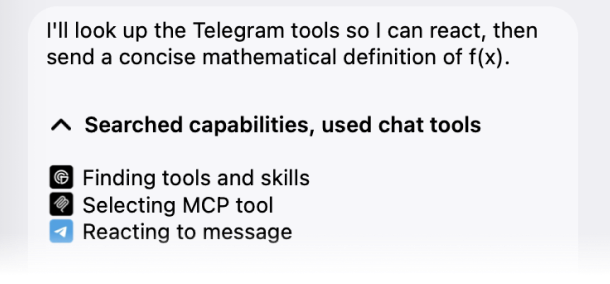
The bot renders tool calls nicely with the tgfx icons premium custom emoji pack: every 𝒇x tool gets its own icon, and so do 100+ popular MCP servers (GitHub, Notion, Slack, Figma, and friends). The model picker uses provider logos (OpenAI, Anthropic, etc.) from the same pack.
To turn it off, start with tgfx --no-icons.
𝒇x doesn't inherit MCP servers from your config automatically in ACP mode that Telegram channel uses. We're working on adding this soon!
tgfx           run fx in this folder (sets up on first run)
tgfx --yolo    same, without fx permission checks
tgfx --output  answer · report · progress · live
tgfx allow     let more users or chats talk to the bot (no id: pair by QR code)
tgfx auth      add, rotate, or remove the bot token
tgfx doctor    diagnostics: token, chats, rights, fx
Details, guarantees, and the rest of the commands live in the specification.