

Mobile app tracking debugger by measure-apps.com. A tool for QA-ing the outgoing analytics hits of a mobile app. It runs as an addon in a local HTTPS proxy (mitmweb).
See every tracking hit your app sends, grouped by tool, one row per event. GA4 / Firebase hits, which are binary protobuf and unreadable in any proxy, are decoded into plain events and parameters.
iPhone only for now. Flashlight is built and tested for apps running on iOS.

- Live hits list on http://127.0.0.1:8082, opens automatically with mitmweb. Pause, Clear, Copy JSON of a hit and a link to the same request in mitmweb
- App filter – under More filters: the app's name and icon from the App Store / Google Play
- Tool detection by domain, with a filter per tool: GA4 (Firebase), GA4 (web), Firebase, Crashlytics, Adjust, AppsFlyer, Meta, Branch, Singular, Kochava, Airbridge, TikTok, Snapchat, Google Ads, Mixpanel, Amplitude, Segment, Braze, CleverTap, OneSignal, AppMetrica, RevenueCat, Sentry, Datadog, Clarity
- One row per event – batched requests (GA4, Meta, Amplitude, Mixpanel, ...) are split into single events
- Regex search across event names, URLs, status codes and parameters
- GA4 decoding – Firebase short names translated (
_e→user_engagement,_et→engagement_time_msec, ...), readable values (dates, durations, LTV in currency), ecommerceitems[], user properties, device & app info - Firebase validation errors – see when the SDK drops a parameter (e.g. value longer than 100 characters)
- Server-side GTM detection – read from the app's Firebase config, see below
- Firebase config – measurement ID, key events, sGTM endpoint and SDK limits
- Firebase SKAN requests decoded
- Other binary payloads decoded as schema-less protobuf
- mitmweb views – the same decoding is available directly in mitmweb's request/response view
- No dependencies – a single Python file, works with the official proxy installers
Most tracking hits are readable in a proxy as they are (JSON or query strings). GA4 is different: the Firebase Analytics SDK sends events to app-measurement.com/a as compressed binary protobuf, so you only see gibberish. The addon decodes it. This is how a GA4 request looks in mitmweb:
# 3 event(s): deeplink_launch, view_item, user_engagement
events:

  - event: deeplink_launch
    time: 2026-10-07 14:44:01.656
    params:
      deeplink_destination: /shop/product/trail-runner-pro-x3
      firebase_event_origin: app
      firebase_error_value: deeplink_url_referrer
      firebase_error_length: 130
      firebase_error: 4 (parameter value too long)

  - event: view_item
    time: 2026-10-07 14:44:01.677
    params:
      currency: EUR
      value: 89
      items:
        - item_id: trail-runner-pro-x3
          item_name: Trail Runner Pro X3
          price: 89
          quantity: 1

  - event: user_engagement
    time: 2026-10-07 14:57:52.547
    params:
      engagement_time_msec: 13m 50s (830080 ms)
      firebase_event_origin: auto

user_properties:
  first_open_after_install: true
  lifetime_value_EUR: 89.00 EUR
  ga_session_id: 1791376498

device_app:
  app_id: com.example.app
  platform: ios
  os_version: 26.6
  consent_state: G1--
timezone: UTC+02:00On start, the Firebase SDK downloads its measurement config from app-measurement.com/config/app/<firebase app id>. The addon decodes it, finds the server-side GTM endpoint (if the app uses one) and remembers its domain. The sGTM domains panel opens with the domain filled in.
Hits sent to that domain are shown as sGTM and GA4 payloads in them are decoded like the ones sent to Google. Any URL with app-measurement on a non-Google domain counts as sGTM as well.
If the SDK has the config cached and doesn't download it again, add the domain by hand under sGTM domains. Hover the button to see the remembered domains; Forget domains clears them.
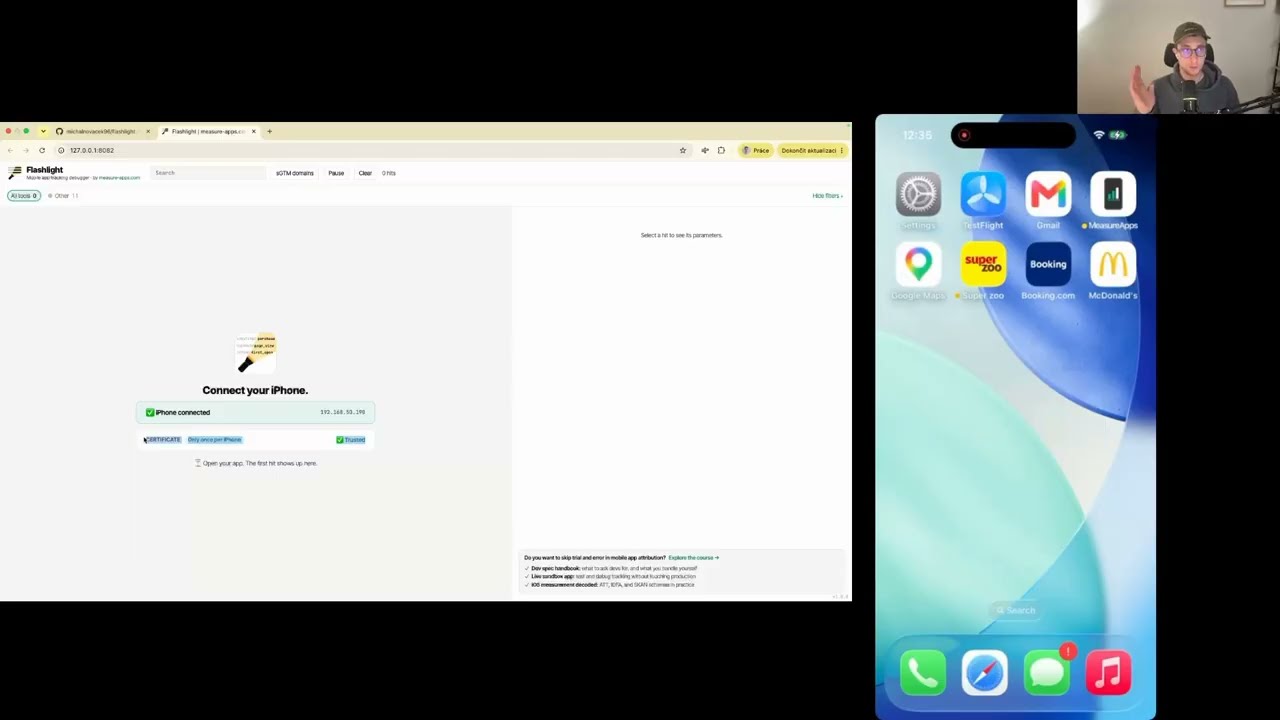
Watch how to install Flashlight
1. Install mitmproxy (version 12 or newer) using Homebrew:
brew install --cask mitmproxyNo Homebrew? Download the installer from mitmproxy.org/downloads.
2. Install the addon:
curl -fsSL https://github.com/michalnovacek96/flashlight/releases/latest/download/install.sh | bashThis downloads the latest release to ~/.mitmproxy/addons/ and registers it in ~/.mitmproxy/config.yaml, so it loads every time you start mitmweb.
1. Install mitmproxy (version 12 or newer) – download and run the Windows installer from mitmproxy.org/downloads.
2. Install the addon:
-
Download
app_tracking_debugger.pyfrom the latest release. -
Create the file
%USERPROFILE%\.mitmproxy\config.yamlwith this content (use the path where you saved the file):scripts: - C:\Users\<you>\Downloads\app_tracking_debugger.py
Alternatively, skip the config and start mitmweb with the script each time:
mitmweb -s C:\Users\<you>\Downloads\app_tracking_debugger.pyRun the install command again (macOS) or download the file again (Windows). The installed version is shown in the bottom right corner of the UI. See CHANGELOG.md for what changed.
Run mitmweb in the terminal. Flashlight opens in your browser at http://127.0.0.1:8082 and shows the steps to connect your iPhone, with your computer's IP address already filled in. It also shows when the iPhone is connected and whether it trusts the certificate. Then use the app and the hits appear live.
Manual setup without the Flashlight page
- Find your computer's local IP address (the iPhone must be on the same Wi-Fi):
- macOS (Terminal):
ipconfig getifaddr en0 || ipconfig getifaddr en1 - Windows (PowerShell):
(Get-NetIPConfiguration | Where-Object { $_.IPv4DefaultGateway }).IPv4Address.IPAddress
- Or in the system network settings (Wi-Fi / Network → Details → IP address).
- macOS (Terminal):
- On the iPhone: Settings → Wi-Fi → (i) next to your network → Configure Proxy → Manual. Server = your computer's IP (e.g.
192.168.1.20), Port =8080. - Open http://mitm.it in Safari on the iPhone and download the mitmproxy certificate. Install it in Settings → General → VPN & Device Management, then trust it in Settings → General → About → Certificate Trust Settings. You only need to do this once per iPhone.
When you're done, set the iPhone's proxy back to Off, otherwise it has no internet on that Wi-Fi.
To see the raw request, click Open in mitmweb in the hit's detail. In mitmweb, tracking requests are marked; filter them with ~marked.
- The GA4 protobuf schema is community reverse-engineered and not complete. Unknown fields are shown as
unknown_<number>or hidden. Contributions are welcome at lari/firebase-ga4-app-measurement-protobuf. - Tool detection is domain based. If an SDK uses a domain that isn't on the list, its hits end up under Other. Please open an issue with the domain.
- Hits are kept in memory only (last 5,000) and are cleared when mitmweb restarts.
- Tool logos are loaded from Google's favicon service and gstatic.com; without internet the UI falls back to coloured dots. The app lookup sends the bundle ID to Apple / Google; turn it off with
tracking_app_lookup=false.
- Built by measure-apps.com
- Protobuf schema: lari/firebase-ga4-app-measurement-protobuf by Lari Haataja (MIT)
- mitmproxy
MIT