English | 简体中文
Official Website: https://www.hellolabel.xyz
HelloLabel is an independent, high-performance image annotation application inspired by Labelme. Starting with v2.0.0, HelloLabel uses a local-first, pure-static Web architecture: the server only delivers HTML / CSS / JavaScript, while source images, same-name JSON files, and AI inference stay on the user's device.
                   HelloLabel 2.0
                        │
           ┌────────────┴────────────┐
           │                         │
          Web                     Desktop
           │                         │
     static Nginx               Electron shell
           │                         │
           └────────────┬────────────┘
                        ▼
                  Chrome / Chromium
            ┌───────────┼────────────┐
            │           │            │
       local files     WebGL2      WebGPU/WASM
            │           │            │
       image / JSON    rendering     AI inference
- No HelloLabel server API: production Web deployment needs no Python, FastAPI, Uvicorn, OpenCV, or PyTorch.
- Images are not uploaded to the ECS/server: opening, switching, viewing, annotating, and saving happen locally in the browser.
- AI runs on the client: WebGPU is preferred with CPU/WASM compatibility fallback where supported.
- Models download on demand and are browser-cached.
- Desktop and Web share the same front-end core: the EXE no longer bundles a Python runtime.


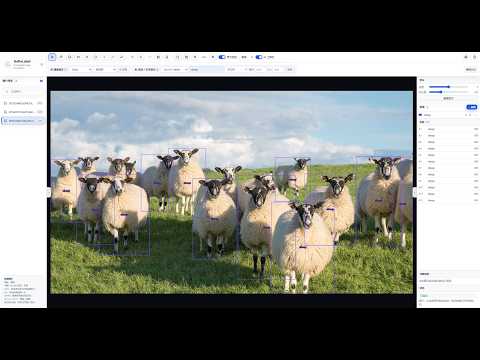
- Manual tools: pointer, brush, polygon, rectangle, oriented rectangle, circle, point, line, and polyline.
- Pointer editing: select/move instances and drag control handles to edit geometry.
- Polygon/polyline edge editing: hover near an edge to snap, then single-click to insert a new movable vertex.
- Polygon closure: snap to the starting point; the start circle expands to visualize the snap radius; single-click to close; right-click rolls points back one at a time.
- Rectangle alignment: full-width/full-height crosshair guides extend to the image edges while drawing.
- Right-click completed geometry: reopen polygon, polyline, rectangle, oriented rectangle, circle, or line; Esc restores the original shape.
- Software-level global Label library independent from the current image.
- Virtualized instance list synchronized with the canvas.
- WebGL2 batch rendering, spatial-grid hit testing, smart/all/selected label display, brightness/contrast preview.
- Undo/Redo:
Ctrl+Z,Ctrl+Y/Ctrl+Shift+Z. - ~300 ms debounced same-name JSON autosave plus explicit Save JSON.
- Chinese/English UI, system/light/dark themes, collapsible panels, persistent AI-toolbar visibility.
| Capability | v2.0 status | Runs on |
|---|---|---|
| YOLO11 Detect | available | browser WebGPU / CPU-WASM |
| YOLO11 Seg | available | browser WebGPU / CPU-WASM |
| SAM2.1 Tiny interactive segmentation | available | browser WebGPU / WASM |
| TIFF preview decode | available | browser locally |
| YOLO-World | not migrated; disabled in UI | — |
| Legacy SAM / SAM3 Python paths | removed | — |
SAM2.1 Tiny interaction:
- left click: positive prompt;
- right click: negative prompt;
- left-drag: Box Prompt;
- Backspace: remove the last prompt;
- Enter: accept the result;
- output conversion: Polygon / Rectangle / Oriented Rectangle / Circle.
The same image reuses its SAM image embedding for subsequent prompt updates. Switching images causes a new encode. The SAM worker serializes encode / decode / reset requests and explicitly disposes temporary tensors and old image embeddings to avoid WebGPU/WASM memory growth during long annotation sessions.
First AI use requires network access to download browser models/runtime assets. Model traffic comes from the model/CDN source; the HelloLabel server does not receive the source image for inference.
HelloLabel v2.0 has no Python application backend, but the page should still be served over HTTP/HTTPS rather than opened directly as file://.
Windows:
start_web.batLinux/macOS:
bash start_web.shThese helpers use Python's built-in http.server only as a development static file server. They do not create a .venv, install requirements, or run FastAPI.
Development URL:
http://127.0.0.1:9010/static/
Production deployment does not require Python. Use Nginx or another static web server. See deploy/README.zh-CN.md for the ECS deployment example.
Windows:
build_web.batLinux/macOS:
bash build_web.shOutput:
dist/web/
├─ index.html
├─ VERSION.txt
└─ static/
Upload the contents of dist/web/ to the web root. deploy/nginx.conf.example provides an HTTPS/static Nginx configuration.
Public deployments should use HTTPS. The provided example also enables cross-origin isolation headers used by high-performance browser WASM paths.
Desktop wraps the same static/ application:
HelloLabel.exe
└─ Electron / Chromium
   └─ 127.0.0.1 static server
      └─ static/
The v2.0 desktop package no longer includes CPython, FastAPI, Uvicorn, OpenCV, PyTorch, or a server-side SAM/YOLO runtime.
Build Windows:
desktop\build_windows.batBuild macOS:
./desktop/build_macos.shBuild Linux:
./desktop/build_linux.shBuild machines require Node.js 22+. End users do not need Python.
Core geometry remains in standard shapes fields:
{
  "version": "7.0.4",
  "flags": {},
  "shapes": [
    {
      "label": "cell",
      "points": [[10, 10], [100, 100]],
      "group_id": null,
      "description": "",
      "shape_type": "rectangle",
      "flags": {},
      "mask": null
    }
  ],
  "imagePath": "image.jpg",
  "imageData": null,
  "imageHeight": 1456,
  "imageWidth": 816,
  "hellolabel": {
    "labels": {
      "cell": {"color": "#38c172"}
    }
  }
}
HelloLabel adds the top-level hellolabel.labels extension for HelloLabel metadata such as label colors. Labelme ignores unknown top-level extension fields when reading the file, so the core shapes structure remains interoperable.
Supported shape_type values:
polygonrectangle(two opposite corners)oriented_rectangle(four points)circle(center + circumference point)pointlinelinestrip
Brush output is saved as a polygon.
Label definitions are application-level in v2.0:
- they persist when switching images/folders;
- instance counts remain per current image;
- adding/deleting/renaming a global Label does not rewrite historical annotation JSON;
- deleting or renaming a global Label does not silently mutate existing shape labels;
- importing Labels merges definitions only and does not modify annotation JSON;
- existing same-name definitions are preserved during import.
The global label library is stored locally in the browser.
| Tool | Key | Interaction |
|---|---|---|
| Pointer | V | select, move, edit control points |
| Brush | B | click to start, move to draw, return near start to close |
| Polygon | P | click vertices; snap+click start to close; right-click rollback |
| Rectangle | R | first corner → crosshair alignment → opposite corner |
| Oriented rectangle | O | two points define edge → third point sets width |
| Circle | C | click center → click circumference |
| Point | D | click |
| Line | L | two clicks |
| Polyline | K | click vertices, Enter to finish, right-click rollback |
Other controls:
Delete / Backspace: delete an editable polygon/polyline vertex when valid, otherwise delete selected instances;Ctrl+Z: undo completed edits; active polygon/polyline point rollback uses right-click only;Ctrl+Y/Ctrl+Shift+Z: redo;Esc: cancel drawing/AI; if a completed shape was reopened, restore the original;Space + left-dragor middle-drag: pan;- wheel: zoom around the pointer;
- pointer near polygon/polyline edge: snap, then single-click to insert a vertex.
Latest Chrome / Edge is recommended for the Web edition:
- File System Access API: local folder selection and same-name JSON autosave;
- WebGL2: high-performance annotation rendering;
- WebGPU: AI acceleration;
- supported AI runtimes attempt CPU/WASM fallback where WebGPU is unavailable.
Public sites should use HTTPS. localhost development may use HTTP.
The master branch includes a Static Runtime Check GitHub Actions workflow that verifies:
- required v2.0 browser-only architecture files;
- Desktop does not reintroduce a Python backend;
- JavaScript syntax;
- browser mask-to-geometry behavior;
- SAM2.1 candidate-mask Tensor extraction;
- SAM2.1 worker memory lifecycle/request serialization constraints;
- a real
build_web.shrun and validation of the generated pure-staticdist/webdistribution.
MIT License for HelloLabel source code. Third-party inference libraries, browser runtimes, and model files remain subject to their respective upstream licenses.