
As initial step you will have to create an application registred in Azure Active Directory in your SharePoint online tenant. You have several options to integrate to SharePoint, based on Pull (Graph/Sharepoint API) or Push (SharePoint Webhook) activation models.
Register your app with the Azure AD v2.0 endpoint - Microsoft Graph | Microsoft Doc
Make sure to cover -
- Configure Callback URL (in case Sharepoint API is executed from postman use https://www.getpostman.com/oauth2/callback)
- API Permissions - assign to Graph permissions for both Sites and Files
- Consent to grant the user the permissions requested
Environment variables:
- tenant
- client_id
- client_secret
- scope = https://graph.microsoft.com/.default
Postman Collection variables (Use Graph collection-Graph.postman_collection.json):
- webUrl -> https://<>.sharepoint.com/sites/<your_site>
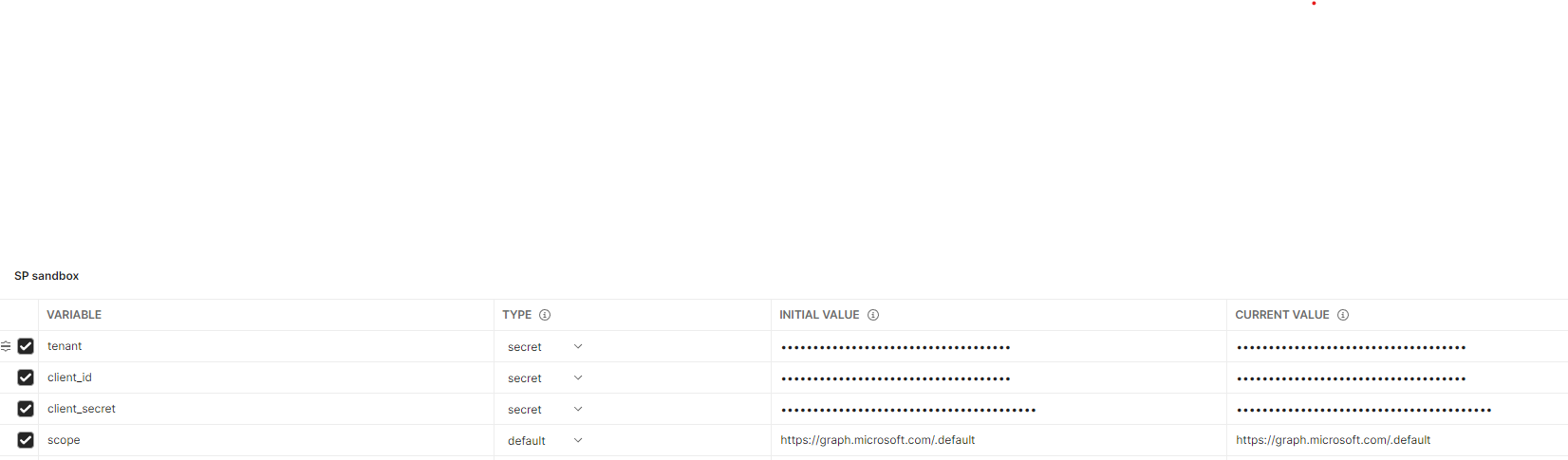
You can check out graph explorer for testing puposes (usefull to make sure your used has appropriate privileges).
https://developer.microsoft.com/en-us/graph/graph-explorer
Example : https://docs.microsoft.com/en-us/graph/api/driveitem-delta?view=graph-rest-1.0&tabs=http
- QuerySiteId -> get your site id based on the webUrl defined in the collection variable.
- QueryDriveId -> get the docuemnts root directory id
- QueryFiles-delta -> get all changes within lastest token, initial request generates a token that later on is stored as a collection var, you can clear the token var to initiate a "clean" start.
Execute the collection operations ->
-
QuerySiteId -> get your site id based on the webUrl defined in the collection variable.
-
QueryDriveId -> get the docuemnts root directory id
-
QueryFiles-lastModifiedDateTime based on webUrl collection variable, operation will query sharepoint object ids and query root document library for chnages based on last modified time
-
API activations can be controlled to support paging, query document library based on path and query by any other field in the payload https://docs.microsoft.com/en-us/graph/api/driveitem-list-children?view=graph-rest-1.0&tabs=http#optional-query-parameters
Webhooks will allow to create a subscription to a SharePoint object and get notification for changed events. Webhook handler has to be implemented in an A-Sync mode and reply back within 5 seconds, in case the activation of the notification service failes there will be automatic retry for 5 times (https://docs.microsoft.com/en-us/sharepoint/dev/apis/webhooks/webhooks-reference-implementation)

https://learn.microsoft.com/en-us/sharepoint/dev/apis/webhooks/get-started-webhooks
Execute the collection operations ->
- GetDocumentsListid -> get your list id based on parameter set (lists/getbytitle('')?$select=Id)
- CreateWebhook -> subscribe to capture changes on the list defined in pre command
- GetListID -> verifies that the subscirption defined exists
- GetChanges -> get the actual changes done