
- Author: Matthew B. Jones, Chris Jones, Ben Leinfelder, Lauren Walker, Bryce Mecum, Peter Slaughter, Rushiraj Nenuji, Robyn Thiessen-Bock (NCEAS)
- License: Apache 2
- Package source code on Github
- Submit Bugs and feature requests
- Task Board
- Discussion list: metacat-dev@ecoinformatics.org
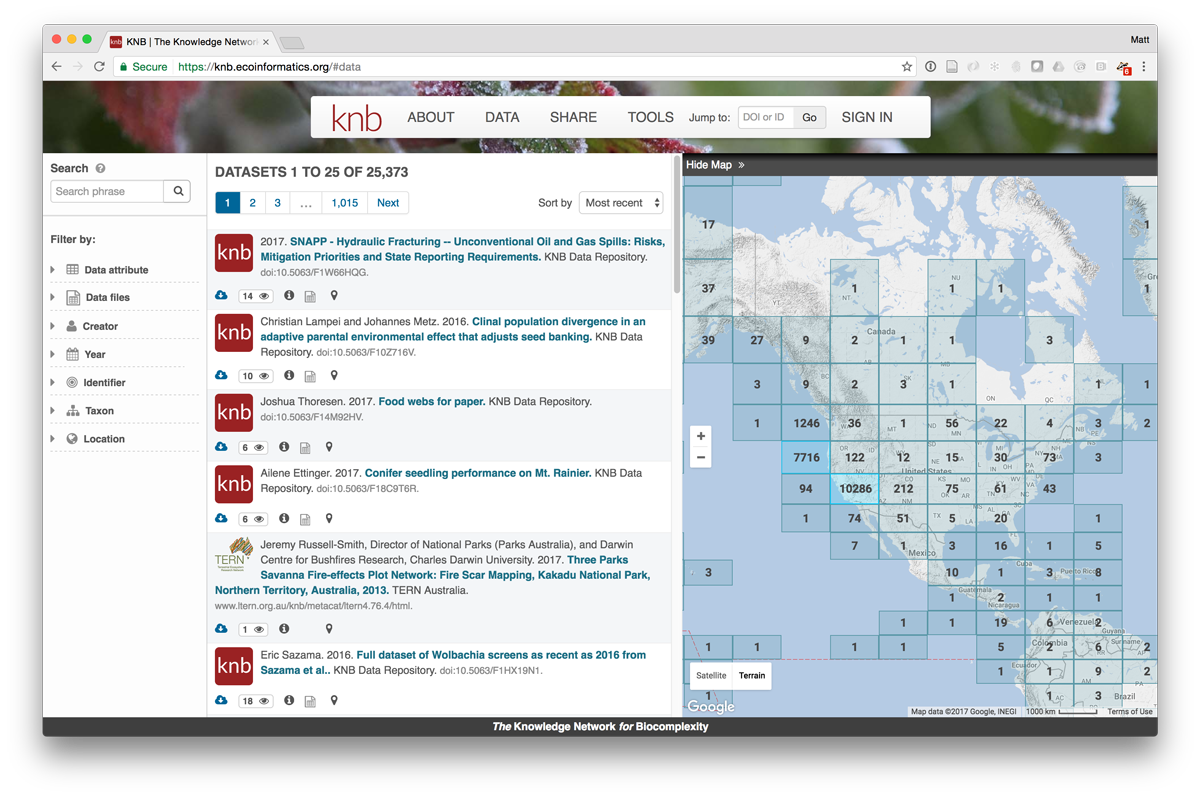
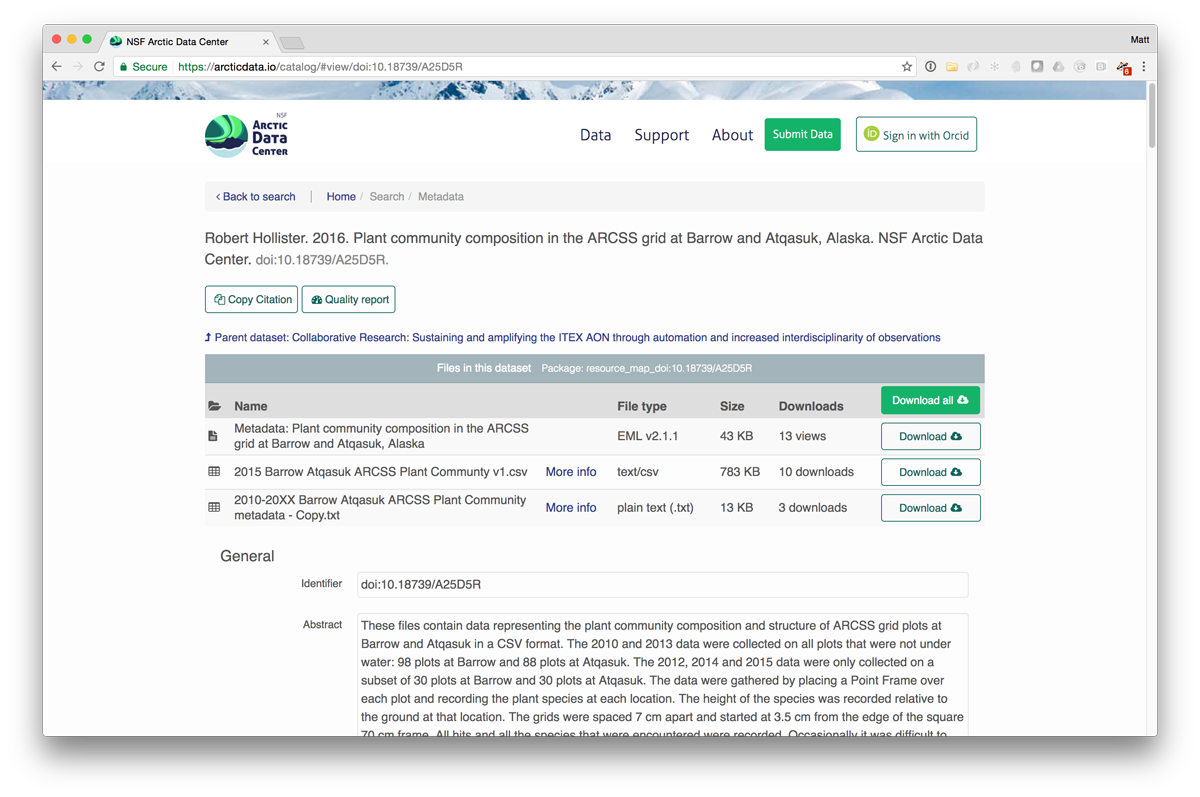
MetacatUI is a client-side web interface for querying Metacat servers and other servers that implement the DataONE REST API. Currently, it is used as the basis for the KNB Data Repository, the NSF Arctic Data Center, the DataONE federation, and other repositories.
MetacatUI is an open source, community project. We welcome contributions in many forms, including code, graphics, documentation, bug reports, testing, etc. Use the discussion list to discuss these contributions with project contributors.
The main search screen, as configured for the KNB Repository:
A metadata view, as configured for the Arctic Data Center:
See the Metacat documentation for full installation instructions. In particular, the themes section of the Metacat documentation gives installation instructions for using MetacatUI with your Metacat repository.
To run MetacatUI, you will need to first install a web server such as Apache. The following instructions are for Mac OS X. Apache comes pre-installed on Mac OS X.
-
Choose a location from which to serve all your Apache website files. A good location is
/Users/{username}/Sites -
Make a subdirectory in
~/Sitesspecifically for MetacatUI. The default directory name for MetacatUI ismetacatui.mkdir ~/Sites/metacatui -
Configure Apache to serve files from your
Sitesdirectory by opening/etc/apache2/httpd.confand changing theDocumentRootpathname. Example:DocumentRoot "/Users/walker/Sites" <Directory "/Users/walker/Sites/metacatui">
-
First, create a backup of the default httpd-vhosts.conf file:
sudo cp /etc/apache2/extra/httpd-vhosts.conf /etc/apache2/extra/httpd-vhosts.conf.bak -
Clear out the example VirtualHost configuration if it is there, and add a VirtualHost for the
~/Sites/metacatuidirectory (make surewalkeris replaced with your username):<VirtualHost *:80> DocumentRoot "/Users/walker/Sites" ServerName metacatui.localhost ErrorLog "/private/var/log/apache2/metacatui-error_log" CustomLog "/private/var/log/apache2/metacatui-access_log" common # Allow encoded slashes in URLs so encoded identifiers can be sent in MetacatUI URLs AllowEncodedSlashes On <Directory "/Users/walker/Sites/metacatui"> FallbackResource /metacatui/index.html </Directory> </VirtualHost>
The FallbackResource configuration is how MetacatUI is able to use real pathnames like /data/page/2 for a single-page application.
The FallbackResource directive requires your Apache version to be 2.2.16 and above. If you're using the earlier versions of Apache, you'll require mod_rewrite in your configuration. Example:
  <Directory "/Users/walker/Sites/metacatui">
  ...
  ...

  <IfModule mod_rewrite.c>
      RewriteEngine On
      RewriteBase /
      RewriteRule ^index\.html$ - [L]
      RewriteCond %{REQUEST_FILENAME} !-f
      RewriteCond %{REQUEST_FILENAME} !-d
      RewriteRule . /index.html [L]
  </IfModule>
  </Directory>
-
Create a host name for
metacatui.locahost. First, open/etc/hosts:sudo vi /etc/hosts -
Add
metacatui.localhostto the bottom of the file. Be careful not to change any other part of this file!:# metacatui local site 127.0.0.1 metacatui.localhost -
Save your
/etc/hostschanges and start (or restart) Apache:sudo apachectl start
-
Download the latest MetacatUI release .zip file and unzip it
-
Open
src/index.htmlin a text editor and change the following values:- Set the
data-themeto your chosen theme name, e.g.default,knb,arctic. - Set
data-metacat-contextto match the Metacat directory name of the remote Metacat you will be using. For example, Metacat is installed at https://dev.nceas.ucsb.edu/knb so thedata-metacat-contextwould be set toknb. Most Metacat installations are atmetacatsince that is the default. - Optional: Replace
YOUR-GOOGLE-MAPS-API-KEYwith your Google Maps API key to enable the Google Map features of MetacatUI. If no API key is given, MetacatUI will still work, it just will not include the map features.
- Set the
-
Open
src/js/models/AppModel.js, or if using a theme other than the default theme,src/js/themes/{theme name}/models/AppModel.jsand change the following values:- Set
baseUrlto the URL where the remote Metacat is (e.g.https://dev.nceas.ucsb.edu) - Set
d1CNBaseUrlto the URL of the DataONE Coordinating Node that the Metacat Member Node is a part of. (e.g. the Member Nodeurn:node:mnTestKNBis in theurn:node:cnStageCoordinating Node, so this attribute would be set tohttps://cn-stage.test.dataone.org/)
- Set
-
Note: If you installed MetacatUI somewhere other than the location in step 2 above: you will need to change the
loader.jspathname inindex.htmland theMetacatUI.rootpathname inloader.jsto the custom location where MetacatUI is located. For example, if you installed MetacatUI at root instead of in ametacatuisubdirectory, yourloader.jspathname inindex.htmlwould be/loader.jsandMetacatUI.rootwould be/.
-
Move the MetacatUI application code to the directory we chose in Step 2.
cp -rf metacatui-2.0.0/src/* ~/Sites/metacatui/ -
Open a web browser and navigate to
metacatui.localhost/metacatuiand your MetacatUI application should be ready to go!
- Follow Step 1-2 above to configure the Apache web server on your local machine.
- Download the latest MetacatUI release .zip file and unzip it
- Open
src/index.htmlin a text editor and change the following values:- Set the
data-themetodataone. - Remove the value of
data-metacat-contextsince DataONE CN URLs do not have a metacat directory - Optional: Replace
YOUR-GOOGLE-MAPS-API-KEYwith your Google Maps API key to enable the Google Map features of MetacatUI. If no API key is given, MetacatUI will still work, it just will not include the map features.
- Set the
- Open
src/js/themes/dataone/models/AppModel.jsand change the following values:- Set
baseUrlandd1CNBaseUrlto the URL where the remote DataONE CN is (e.g.https://cn-stage.test.dataone.org)
- Set
- Open
src/loader.jsand set the value for the following property:- Set
MetacatUI.rootbased on the location off of its top directory. Example:- If the source code is located at
~/Sites/metacatui(as detailed in Step 1), set theMetacatUI.root = "/metacatui".
- If the source code is located at
- Set
-
Move the MetacatUI application code to the directory we chose in Step 1.
cp -rf metacatui-2.0.0/src/* ~/Sites/metacatui/ -
Open a web browser and navigate to
metacatui.localhost/metacatuiand your MetacatUI application should be ready to go!
While developing on MetacatUI, it's necessary to run a web server of some sort in order for the application to work completely. You can set up a web server such as Apache as described above in the Installation section but MetacatUI also comes with a simple Express.js application that uses node.js.
Pre-requisites:
- node.js and
npm - Express.js: Install with
npm install express
Steps:
- Set up
index.htmlandloader.jsas described above in the Installation section. - Run the folowing commands in a terminal:
# from this repository's top level directory
npm install express
node server.js
Now MetacatUI should be serving at http://localhost:3000 and you should be able to visit it in your web browser.
Copyright [2013] [Regents of the University of California]

Licensed under the Apache License, Version 2.0 (the "License");
you may not use this file except in compliance with the License.
You may obtain a copy of the License at

http://www.apache.org/licenses/LICENSE-2.0

Unless required by applicable law or agreed to in writing, software
distributed under the License is distributed on an "AS IS" BASIS,
WITHOUT WARRANTIES OR CONDITIONS OF ANY KIND, either express or implied.
See the License for the specific language governing permissions and
limitations under the License.
Work on this package was supported by:
- NSF-ABI grant #1262458 to C. Gries, M. B. Jones, and S. Collins.
- NSF-DATANET grant #1430508 to W. Michener, M. B. Jones, D. Vieglais, S. Allard and P. Cruse
- NSF DIBBS grant #1443062 to T. Habermann and M. B. Jones
- NSF-PLR grant #1546024 to M. B. Jones, S. Baker-Yeboah, J. Dozier, M. Schildhauer, and A. Budden
Additional support was provided for working group collaboration by the National Center for Ecological Analysis and Synthesis, a Center funded by the University of California, Santa Barbara, and the State of California.
