Paste for windows - #35
Conversation


'paste' doesn't work in windows, the below settings work in windows.

let g:system_copy#copy_command='clip'
let g:system_copy#paste_command='powershell.exe -NoLogo -NoProfile -Noninteractive -Command "Get-Clipboard"'

|
Hi @ptimothyp, I'm surprised to see this. I'm not a windows user myself so I've just trusted what others have shared, but you're the first person (that I can remember) who has run into an issue, and my quick search points to Overall I'd want to understand better what's going on here before making a change. Any thoughts based on the above? |
|
Hi @christoomey, thanks for your response. Thanks for pointing out that you can install a third party utility for paste. I was going along the lines of since, powershell is installed by default in most later versions of windows, why not just use the funtionality that comes along with the Operating system and use it as default... There is always the option to override it using the I've pushed an update, which uses the power-shell clipboard command as the default command. Leave it in you capable hands to make the decision. Thanks once again for this plugin, I find it very useful.. Thumbs-up to your awesome presentation which is what lead me to this plugin. |

|
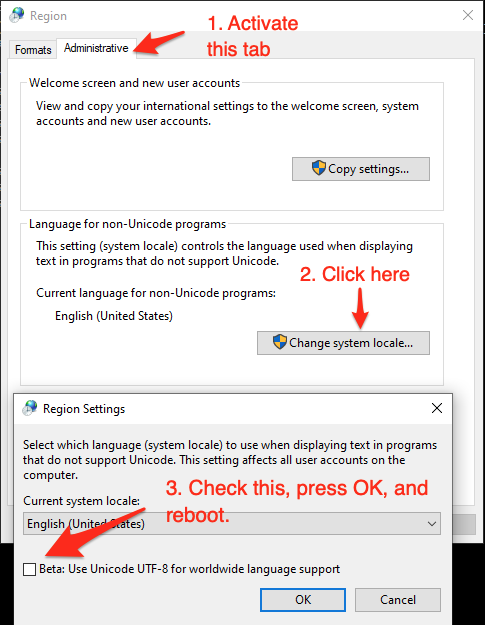
Just to add that Windows might not use UTF-8 encoding by default. On my Windows PC, the default regional setting is According to this discussion, I found two solutions:
|
3 participants


'paste' doesn't work in windows, the below settings work in windows.
let g:system_copy#copy_command='clip'
let g:system_copy#paste_command='powershell.exe -NoLogo -NoProfile -Noninteractive -Command "Get-Clipboard"'