
English · 简体中文 · 日本語 · 한국어 · Русский




Install · Use · Benchmarks · How it works · Why · Limits · Contributing · Licence
An agent-native QA CLI for web pages. Deterministic, no tests to write, no LLM.
pip install assay-ui
Checking a drag-to-reorder list with a bug in it.
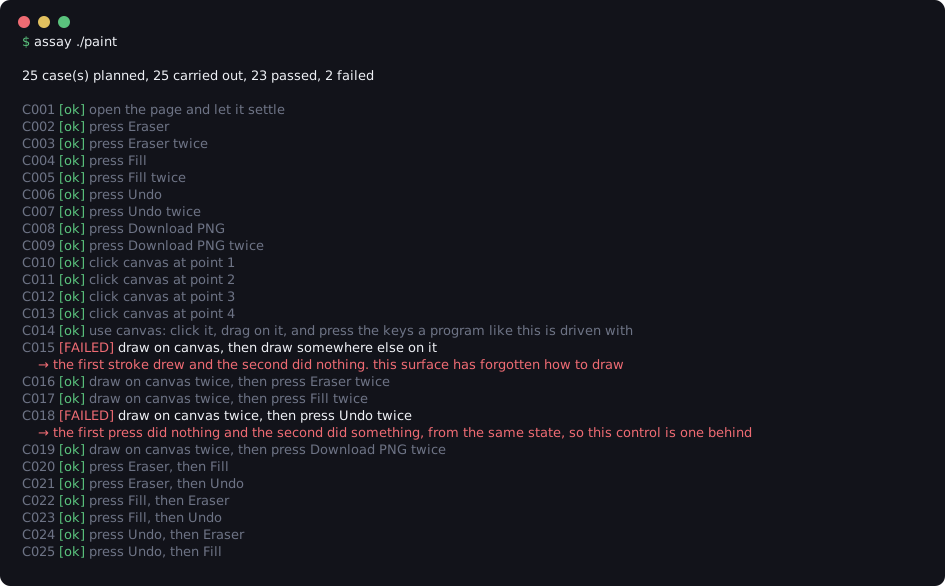
assay opens your page in Chromium, finds every control on it, uses all of them, and reports what went wrong.
- No tests to write. assay builds its checks from the controls it finds on the page.
- No LLM. There's no API key and no cost, and every run gives the same result.
- Works with coding agents. A skill, supported across fifteen harnesses, has the agent check each page it writes, and a plugin for Claude Code and the DeepSeek Harness runs the check automatically after every turn.
- Groups repeats. When one bug fails several checks, the later ones say same finding as C003 instead of repeating the message.
pip install assay-ui # Python 3.10+uv tool install assay-ui # no Python 3.10+? uv downloads onepipx install assay-ui # installs assay in its own isolated environmentIf pip isn't found, use python3 -m pip install assay-ui. The first run
downloads Chromium if needed.
To work on assay itself:
git clone https://github.com/awss1i/assay.git && cd assay
pip install -e ".[dev]"Install the CLI above first, then follow the harness setup → to add the skill or plugin in any of the fifteen supported harnesses.
assay ./my-app                    # check index.html in this folder
assay ./my-app --report out.html  # also write an HTML report with screenshots
assay ./my-app --one-line         # short summary, for scripts and agents
The exit code is non-zero if anything failed, and nothing is written to disk unless you ask.
The full flags, a worked example, the Python API and the HTML report →
The skill works in all fifteen supported harnesses: Claude Code, DeepSeek Harness, opencode, Antigravity, Codex App, Codex CLI, Cursor, Devin CLI, Factory Droid, Gemini CLI, GitHub Copilot CLI, Grok Build CLI, Kimi Code, Pi and Hermes Agent. It tells your agent to run assay after finishing a page and end its reply with the result:
assay: checked todo/todo.html, 8 checks, nothing flagged.
The plugin (Claude Code and the DeepSeek Harness) adds a hook that runs the check automatically at the end of each turn that changed a page. Either way, the agent reports what assay found and doesn't change code because of it unless you ask.
/plugin marketplace add awss1i/assay
/plugin install assay@assay
How the skill and plugin work →
assay is scored on two sets of pages in this repository, and the scoring scripts write every number below.
Pages written by AI. 225 small web apps an AI wrote from 75 prompts, three times each, which a person then opened and tried.
assay found the real bug on 15 of the 20 broken pages and flagged 0 of the 205 working pages. Every page and result.
Pages with planted bugs. A separate agent, never told assay exists, took 10 working apps and planted 5 bugs of its own choosing in a copy of each, then listed them.
assay found 12 of the 50 planted bugs and flagged 0 of the 10 original pages. Every bug and result.
assay runs in five steps:
- Serves the folder on localhost and opens the page in Chromium.
- Waits until the page's controls stop changing.
- Lists every control the browser renders, including clickable divs, drag handles and editable regions.
- Plans checks from those controls: press every button once and twice, type empty, ordinary, very long and HTML-laden text into fields, change every dropdown, draw on canvases, fill in and submit forms, and more.
- Runs each check in a fresh tab and compares the page before and after.
assay doesn't know what your page is for, so a button that changes nothing isn't a failure by itself. Instead it reports places where the page contradicts itself. For example:
- the page throws an error,
- Undo does nothing on the first press and works on the second,
- a count of items shows 1 when the list is empty,
- a total goes up when an item is added but not down when one is removed,
NaNappears where a number should be,- nothing on the page responds to any control.
Playwright and Cypress need tests someone wrote. Visual regression needs a reference screenshot. Asking a model to review the code means reading it, not running it. assay runs it, with nothing prepared in advance.
| needs tests written | needs a baseline | runs the program | |
|---|---|---|---|
| Playwright / Cypress | yes | no | yes, the parts you wrote |
| Percy / Chromatic | no | yes | it screenshots it |
| ask a model to review it | no | no | no, it reads the source |
| assay | no | no | yes, all of it |
- It can't check intent. A page that runs but does the wrong thing, like a total that adds wrongly, usually passes. To check that, pass acceptance criteria from Python.
- Web pages only. It checks one page at a time, served from a local folder. It doesn't crawl, log in or use live network calls.
- Built output only. It won't run
npm installor your build. Point it at a source tree and it tells you what to run first. - A finished game can look broken. A game that has ended with no way to restart stops responding, and that can be reported as nothing responding.
- Speed. Most pages take a few seconds to a minute. The benchmark page has every page's time and the machine they were measured on.
Report bugs and false alarms as issues, send changes as pull requests, and ask questions or share ideas in Discussions. See CONTRIBUTING.md.
MIT.