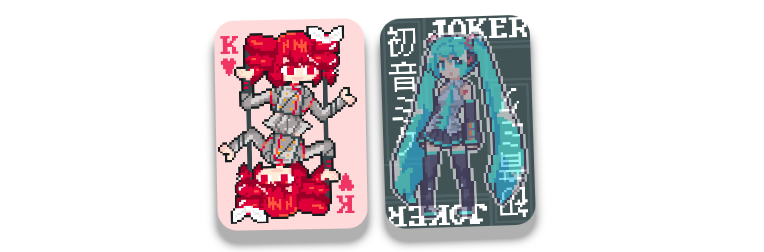
This project recreates an interactive card effect using HTML, CSS, and JavaScript. Each card is individually configured via data attributes and reacts dynamically to mouse movements and hover events.
The effect creates a 3D illusion with smooth animations when interacting with each card. There are two distinct variants available:
-
Loyal Effect:
Tries to recreate the original effect from Balatro. -
Custom Effect:
Provides a more subtle interaction by slowing down the animation when hovered and speeding up on mouse exit.
-
HTML Structure:
Each card is wrapped in an.item-containerthat includes:.card: The primary visual element..overlay: An overlay element that appears on hover..shadow: A shadow element to add depth.
-
Data Attributes:
Configure each card by setting:data-card-src: The default background image.data-hover-src: The image used when the card is hovered (optional).data-overlay-src: The overlay image (optional).
-
CSS:
The CSS is organized into sections handling global styles, container styles, and specific styles for the card, overlay, and shadow. Each effect variant has its own style adjustments. -
JavaScript:
A script attaches event listeners (mouseover,mouseout,mousemove) to each.item-containerto update transform properties and create the interactive animation. Animation parameters likeNORMAL_SPEED,SLOW_SPEED, andconstraindictate the intensity and behavior of the effect.
-
Behavior:
- Speeds up animation during hover.
- Applies continuous movement when the mouse is not over the card.
- The card image may change on hover if a hover source is provided.
-
Files:
- Script:
balatrocards_loyal/script.js - Styles:
balatrocards_loyal/styles.css
- Script:
-
Behavior:
- Slows down animation when hovered, then speeds up when the mouse exits.
- Provides a more controlled and subtle interactive feel.
-
Files:
- Script:
balatrocards_custom/script.js - Styles:
balatrocards_custom/styles.css
- Script:
-
Clone or Download:
Get a copy of the project files to your local machine. -
Customize Cards:
Duplicate the.item-containerblock in your HTML file to add additional cards. Configure each card using:data-card-srcdata-hover-srcdata-overlay-src
Example:
<div class="item-container" data-card-src="default-image-url.png" data-hover-src="hover-image-url.jpg" data-overlay-src="overlay-image-url.png">
    <div class="overlay"></div>
    <div class="card"></div>
    <div class="shadow"></div>
</div>
-
Customize Styles:
Adjust the CSS in the corresponding style files (for Loyal or Custom effects) to suit your design preferences. -
View the Project:
Open the HTML file in a modern web browser that supports CSS3 and JavaScript. Hover over the cards to experience the interactive effect.
- Images & Backgrounds:
Swap images by updating the data attributes in the HTML. - Animations:
Modify parameters in the JavaScript files to adjust the animation speed and effect intensity. - Responsive Design:
The container is designed to be centered on the viewport. You can modify the CSS if you wish to adjust the layout.
This project is open source and available under the MIT License.
Inspired by the incredible team behind Balatro and it's aesthetics.