- Install Ubuntu
- Git Guide
- Install SQLite: README / pdf
- Install and run YCSB-TS: README
Installing git should be a simple apt-get / yum/ etc install.
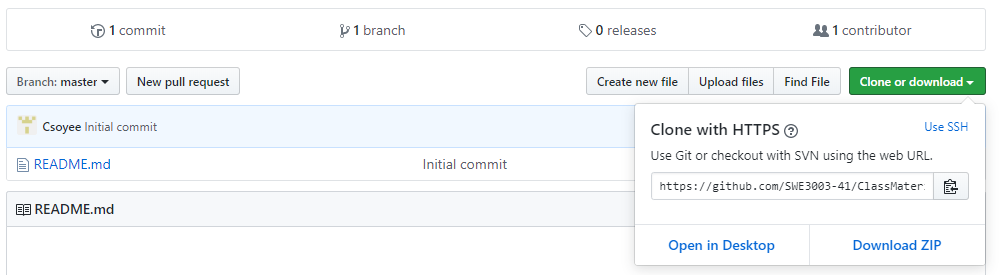
You can get web URL for repository just as above image.
- You can clone the current lab repository by issuing the following command on the command line:
# format
$ git clone [web URL]

# example
$ git clone https://github.com/SWE3003-41/ClassMaterial.git
If you get an error doing clone most likely the cause is that you just haven't finished setting up your Github account.
- Than change your working path to your newly cloned repository:
$ cd ClassMaterialOnce new commit version is released, pull in the changes from your local directory:
$ git pull origin master!! In case of miniBase project fork repository and work on your own account!

Press Fork button to work on your own repository.
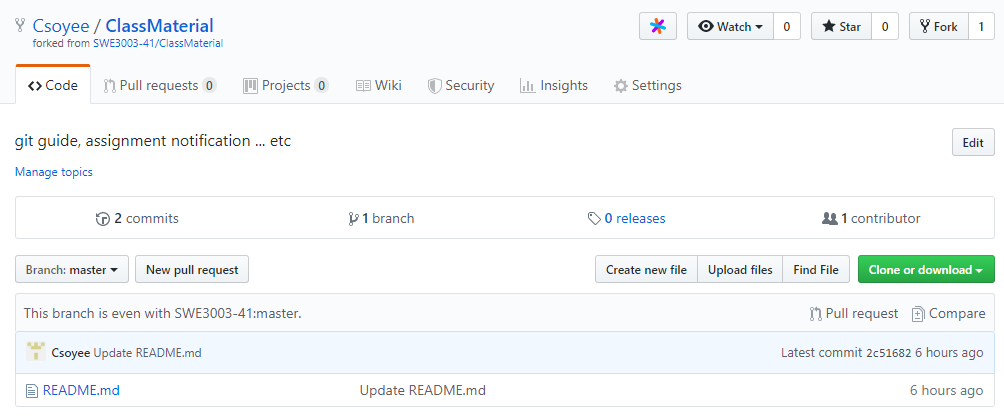
Than you can see forked repository on your own account.
- Clone forked repository:
$ git clone https://github.com/[YOUR_USER_NAME]/[FORKED REPO].git- List the current configured remote repository for your fork:
$ git remote -v
  origin htts://github.com/[YOUR_USER_NAME]/[FORKED REPO].git (fetch)
origin htts://github.com/[YOUR_USER_NAME]/[FORKED REPO].git (push)- Specify a new remote upstream repository that will be synced with the fort
$ git remote add upstream https://github.com/SWE3003-41/[ORIGINAL_REPO].git- Verify the new upstream repository you've specified for your fork
$ git remote -v
  origin htts://github.com/[YOUR_USER_NAME]/[FORKED REPO].git (fetch)
  origin htts://github.com/[YOUR_USER_NAME]/[FORKED REPO].git (push)
  upstream htts://github.com/SWE3003-41/[ORIGINAL_REPO].git (fetch)
upstream htts://github.com/SWE3003-41/[ORIGINAL_REPO].git (push)- Change the current working directory to your local project
- Fetch the branches and their respective commits from the upstream repo. Commits to master witll be stored in local brance,
upstream/master.
$ git fetch upstream
> remote: Counting objects: 75, done.
> remote: Compressing objects: 100% (53/53), done.
> remote: Total 62 (delta 27), reused 44 (delta 9)
> Unpacking objects: 100% (62/62), done.
> From https://github.com/SWE3003-41/[ORIGINAL_REPO]
> * [new branch] master -> upstream/master- Check out your fork's local
master branch
$ git checkout master
Swithed to branch 'master'- Merge the changes from
upstream/masterinto your localmaster branch.
$ git merge upstream/master