
A Model Context Protocol server for procedural voxel modeling and MagicaVoxel (.vox) file workflows. It runs locally over stdio, keeps models in memory, and writes files only inside a workspace directory you choose. A configured MagicaVoxel installation is accessible through restricted read-only roots.
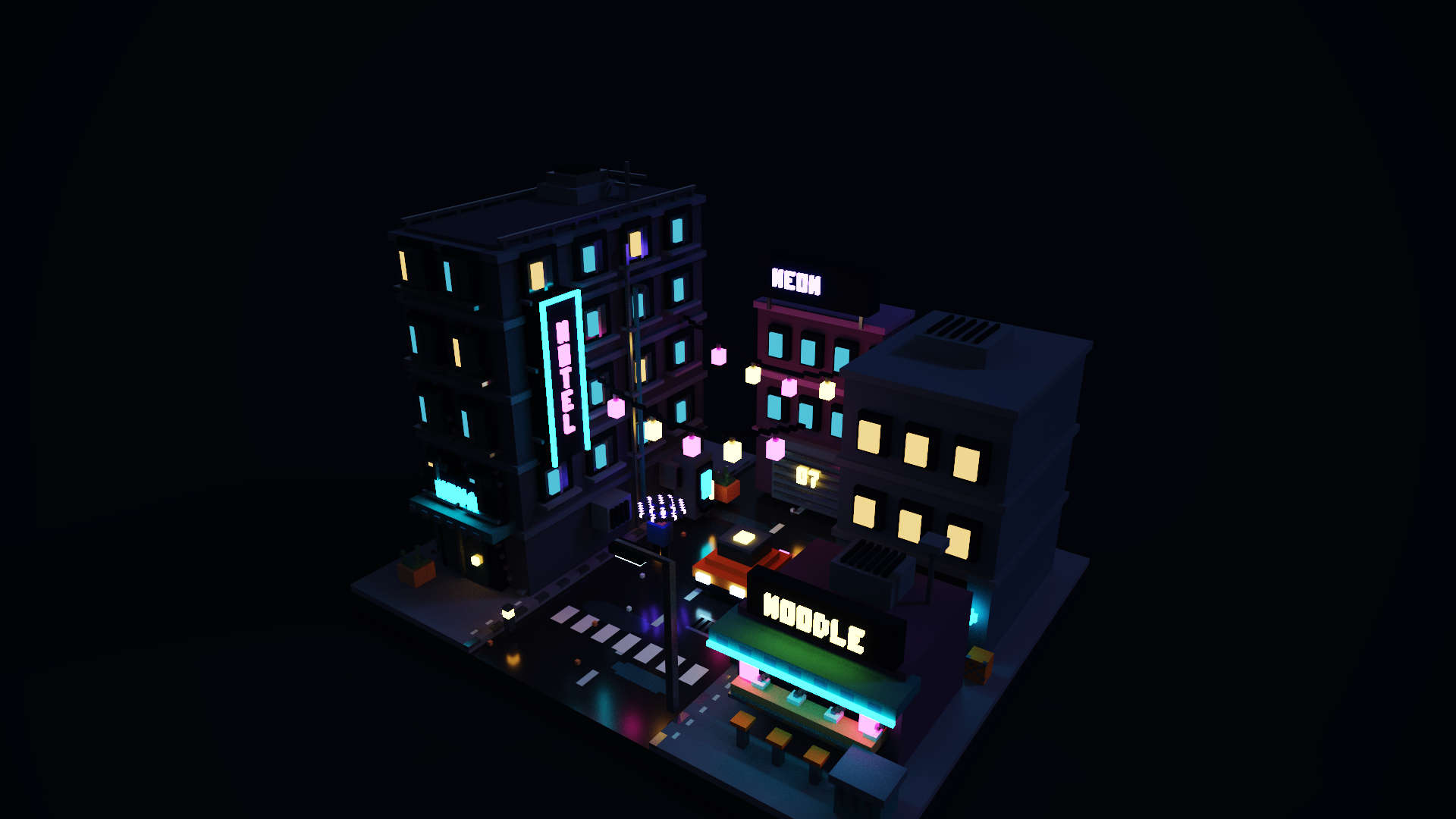
Neon Alley: modeled, lit and rendered through the tools in this repository. The picture is MagicaVoxel's own Final Render at 1920x1080, not the palette preview. See examples/neon-alley for the scene file and the script that builds it.
-
Models and editing: primitives (box, sphere, cylinder, cone, pyramid, torus, line), explicit voxels, copy/paste, transforms, boolean operations, morphology (erode, dilate, smooth, hollow, outline), patterns, gradients, noise and symmetry tools.
-
Undo/redo:
undoandredocover model edits;undo_sceneandredo_scenecover scene edits with independent bounded per-scene history. Failed edits roll back automatically. File writes and frame-registry animation edits are not undone. -
VOX files: strict reader and writer for version 150/200 files with the official default palette.
load_voxrejects multi-model files instead of silently dropping data: passmodelIndexto load one model, or useload_vox_modelsto load every model of a multi-model or animated file (plus a scene that keeps the transforms). Both tools andload_sceneacceptlenient: trueto recover from duplicate voxels, invalid UTF-8 and malformed render chunks; recovered problems are returned aswarnings. -
Scenes:
create_scene,load_scene,load_vox_models,save_scene,flatten_scene,get_scene_info,list_scenes,delete_scene,extract_scene_model,replace_scene_model,set_scene_node,set_scene_layer,set_scene_material. Transform, group, shape, layer and material records are preserved and unknown chunks are written back unchanged. Render settings (rOBJ,rCAM,NOTE,IMAP,META) are parsed into typed fields and written back byte-for-byte when unchanged. Scenes require one shared palette (a model without a palette is read with the default palette;replace_scene_modelreports the first differing index and acceptsremap: "nearest"). Transforms are stored rather than baked unless you ask:flatten_scenemerges all visible objects into one world-space model (hidden layers skipped by default,splitIntoChunksfor results above 256 per axis) andextract_scene_modelacceptsbake. Only the 24 right-angle orientations exist in the format. The pivot rule used for baking (offset from cellfloor(size / 2)) is unverified against the application. Parsed scenes stay in memory, so repeated calls do not re-decode the file. -
MagicaVoxel installation (read-only):
get_magicavoxel_info,list_magicavoxel_samples,list_magicavoxel_palettes,list_magicavoxel_shaders,list_magicavoxel_iblandload_magicavoxel_samplediscover the sample models, palettes, xs shaders, environment maps andconfig.txtof a MagicaVoxel folder. The folder is never written to, and nothing is started. -
Preview:
render_modelreturns a palette-colored PNG (top,front,side,zmax,isometric) directly to the client. -
Generators: houses, characters, vehicles, furniture, weapons, structures, creatures, nature, terrain, trees, and city/venue helpers. Output is deterministic for a given seed.
-
Images: colorized voxelization, silhouettes, depth maps, edge detection and multi-view carving from PNG/JPEG.
-
Animation: frame registry, deterministic dissolve between frames, sprite sheets, PNG frame folders, GIF with per-frame timing and loop setting, native scene transform/model keyframes and
animation_to_scene. Native conversion compiles per-tick models including final holds, writes saved timeline ranges and exposes bounded live range/frame/speed controls. Native speed is not an FPS guarantee. -
Palettes: load and save MagicaVoxel palette PNGs (
import_palette_png,export_palette_png), Adobe.actand palette-only VOX files;remap_model_to_palette,quantize_model,sort_palette,find_nearest_colorandmerge_paletteswork in CIE Lab and report the color error. -
Export/import: VOX, OBJ (basic or MagicaVoxel profile with
.mtland palette texture), PLY, STL, glTF 2.0 (embedded), PNG slices, Qubicle.qb, indexed/direct XRAW, explicit headerless RAW, Build-engine KVX, Slab6 VOX, Sponge.schem(v2/v3) and legacy Minecraft.schematic; OBJ import with solid fill and colors, SVG import with paths, fills and transforms. -
Live application control (Windows, opt-in):
attach_magicavoxel_app,set_app_camera,set_app_animation_timing,export_app_camera_snapshot,export_native_renderandexport_native_sequencedrive a running MagicaVoxel window through its own console and Final Render dialog. Disabled unlessMAGICVOXEL_MCP_UI_AUTOMATION=1; see Live application control. -
xs shaders:
list_xs_shaders,read_xs_shader,validate_xs_shader,write_xs_shader(workspace only),generate_xs_shader_templateandrun_xs_shader. Shaders are read from the workspace or from theshaderfolder of the MagicaVoxel install (MAGICAVOXEL_HOME, or the folder ofMAGICAVOXEL_PATH); the install folder is never written.run_xs_shaderuses a built-in sandboxed interpreter for a documented GLSL subset (no code is evaluated by the JavaScript engine) and is undoable. Seedocs/xs-shader-evaluation.md.
See Scene workflows for object insertion/duplication/removal/reparenting, layer deletion, scene history, typed materials/lighting/cameras, native keyframes and installed palette workflows.
- Node.js 22.2 or newer
- MagicaVoxel is optional: it is needed for application launch/control and installation discovery tools
git clone https://github.com/KaanDRoid/voxel-mcp.git
cd voxel-mcp
npm ci
npm run build
This is a local source installation. An npm account and a published npm package are not required. See client-config for Windows paths and troubleshooting.
Point your MCP client at dist/index.js (see client-config):
{
  "mcpServers": {
    "magicvoxel-mcp": {
      "command": "node",
      "args": ["/absolute/path/to/magicvoxel-mcp/dist/index.js"],
      "env": { "MAGICVOXEL_MCP_WORKSPACE": "/absolute/path/to/workspace" }
    }
  }
}| Variable | Purpose |
|---|---|
MAGICVOXEL_MCP_WORKSPACE |
Directory for all reads and writes. Defaults to the server's working directory. Paths that escape it, including through symlinks, are rejected. |
MAGICAVOXEL_PATH |
Absolute path to MagicaVoxel.exe or MagicaVoxel, enabling open_in_magicavoxel and installation discovery. Takes precedence over MAGICAVOXEL_HOME. |
MAGICVOXEL_MCP_TOOLSETS |
Optional comma-separated tool groups: core, modeling, scene, animation, palette, formats, shaders, app. Core is always included; unset enables all. See Tool selection. |
MAGICVOXEL_MCP_UI_AUTOMATION |
Set to 1 to allow the live-application tools, which send real mouse and keyboard input to the MagicaVoxel window (Windows only). Off by default. |
MAGICAVOXEL_HOME |
The MagicaVoxel installation folder (the one containing the executable, config, vox, palette, shader and ibl). Enables the discovery tools and, when MAGICAVOXEL_PATH is unset, open_in_magicavoxel. |
When an installation is configured, its vox, palette, shader and ibl folders and its config text files become readable by absolute path (only .vox, .png, .txt and .hdr files respectively). Executables, the cache folder and everything else in the installation stay unreadable, and nothing in it can be written, even if it is inside the selected workspace; all writes remain confined to the workspace.
open_in_magicavoxel only opens .vox files and starts the application with the installation folder as its working directory.
magicavoxel://install, magicavoxel://samples, magicavoxel://palettes and magicavoxel://shaders describe the installation. magicavoxel:samples and magicavoxel:palettes are deprecated aliases that return plain file-name lists from the installation (previously they looked in the workspace). magicavoxel:models and magicavoxel:vox/{folder} are unchanged.
set_scene_material edits palette materials, including emissive, metal and roughness
properties. set_scene_render_object merges string-valued native rOBJ settings
such as _uni (uniform sky), _inf (sun), _film and _bloom.
set_scene_camera creates or updates native rCAM slots 0..9. Unknown properties
and unrelated scene chunks are retained; conflicting render object types are rejected.
These are low-level file settings, not a normalized physical-light API. Save the
scene and reopen it in MagicaVoxel to inspect the native result. Camera slots are
saved presets; writing one does not select it or move an already-open viewport.
The render_model PNG remains a palette-colored preview: it does not path-trace
these materials, reflections, bloom or native render settings. Live camera changes and native renders are available through the opt-in tools below.
MagicaVoxel can be driven while it is running, with five tools. They are off unless the server is started with MAGICVOXEL_MCP_UI_AUTOMATION=1, they only work on Windows, and they are calibrated for MagicaVoxel 0.99.7.2 (other versions are refused unless MAGICVOXEL_MCP_UI_ANY_VERSION=1).
-
attach_magicavoxel_apppins one running process. It matches the executable path fromMAGICAVOXEL_PATH, the process id and the process start time; a window title or file name is never trusted. Start the application withopen_in_magicavoxelfirst and switch it to Render mode. -
set_app_cameratypes the application's own console commandscam x/y/z,cam zoom,cam fovandcam rx/ry/rz(absolute values, angles in degrees; a negativerxlooks down from above).focus: truefirst runscam focus, which re-frames the whole scene.zoomwas not calibrated and is not a linear distance: a small value can move the camera far into the scene, so start withfocusand check the result. -
export_native_rendersets the Photo size, clicks the application's own Render button, enters the output path in the save dialog that this click opened and waits. It returns only when the PNG exists, has stopped changing, is a regular file inside the workspace that was written during this call, passes structure and checksum checks, and has the requested size (imageWidth,imageHeight, 1..12000). It never overwrites a file, and the path must be plain (absolute, no% * ? " < > |). -
export_app_camera_snapshotsaves the actual current pose into a camera slot, uses native Save As to a fresh workspace.voxfile and returns the decoded native camera dictionary. This changes the slot and active project filename. -
export_native_sequenceinvokes native Turntable or Anim Final Render and verifies every expected PNG. Sequences use the current render-buffer resolution, not Photo dimensions. Turntables allow up to 120 frames; animations use an inclusive timeline range with at most 120 outputs.
export_app_camera_snapshot {path:"out/camera.vox", cameraId:9}
export_native_sequence {path:"out/orbit.png", kind:"turntable", frames:24, angle:360, blur:0}
export_native_sequence {path:"out/clip.png", kind:"animation", start:2, end:3}
See Native workflows for side effects, filename suffixes, safety limits and supervised checks. Keep the window fully on screen and close existing dialogs first.
What the tools guarantee, and what they do not:
- Before every single key press and click the helper checks that the pinned process owns the foreground, and before each click that the window under the cursor belongs to it. If another window takes the foreground, or the mouse is moved, input stops with an error. There is also a time budget, and modifier keys are released on failure. A check cannot be atomic with the input event, so a window that appears in that instant can still receive one event: do not use the computer while a call runs (a few seconds, plus the render).
- Focus is moved with thread attachment, not with synthetic keys, so nothing is sent to the window that was in front.
- The console is not cleared with Backspace. The text goes into the console field as keystrokes, so the application must really be in Render mode: in the model editor the typed letters are editing shortcuts. The tools cannot check the mode.
- Process identity and finished files are verified. Camera commands are reported as submitted;
export_app_camera_snapshotseparately decodes the actual pose from a fresh native Save As snapshot. It changes the selected camera slot, updates that slot and changes the active project filename; it is not passive memory polling. - Click positions (Image tab, Render button, console) are relative to the window and the
ui_scalesetting; they were calibrated on one layout. If the save dialog does not appear, the call fails instead of guessing. An application running as administrator cannot receive the input, and the call reports that. - Existing dialogs refuse automation before input. Main-window input requires that exact window in front. A new native file dialog must have the expected owner and filename controls, and filename input additionally checks focus on that exact field. Unexpected dialogs stop input rather than receiving the path.
- Bringing the window to the front visibly interrupts whatever you are doing, and other tools wait while a render runs.
- Only one live operation runs at a time. Final renders take as long as the application needs.
Every tool advertises its group and possible effects. Set
MAGICVOXEL_MCP_TOOLSETS to reduce the catalog for your workflow. Successful JSON
results also include structured data without removing existing text or images.
Queued requests, active shader workers and native-render waiting support
cooperative cancellation; synchronous tools cannot be interrupted mid-execution,
and cancelling the helper does not stop a render already started in MagicaVoxel.
Forced helper termination may leave a pressed modifier or mouse button down.
See Tool selection and result metadata for exact limits.
Scene inputs are limited to 16 MiB, with independent estimated allocation budgets: 64 MiB retained across scenes and history, and 256 MiB for transient work. These are conservative accounting units, not measurements of exact JavaScript heap usage. Scene history defaults to 16 snapshots/16 MiB per scene; large snapshots may be evicted. Native track editing/baking accepts up to 512 keys per track. If an automation helper cannot be stopped conclusively, tools are disabled until the helper is stopped and the MCP server restarted.
Models are at most 256 voxels per axis (the VOX limit) and 2,000,000 voxels each. The registry holds up to 64 models and 8,000,000 voxels with a bounded undo history. Input files are limited to 64 MiB; images to 32 MiB and about 4.2 million pixels. Oversized or malformed input returns a tool error.
xs shader runs are limited to 200,000 interpreter steps per voxel, 4,096 iterations per loop, shader sources of 256 KiB and a wall-clock limit (default 20 s, at most 120 s). Evaluation runs in a worker thread so it cannot block protocol pings, and timeout leaves the model unchanged. Dense shaders with long loops (for example the shipped Mandelbulb) take about a minute at 128^3 and are best run on smaller volumes.
Palette PNG imports require exactly 256 pixels (for example 256x1 or 16x16). PNG dimensions and inflated scanline sizes are checked before decoding, including interlaced files. Schematic NBT input is limited to 64 MiB after decompression, 100,000 parsed nodes and a 64 MiB estimated allocation budget.
- X = right, Y = forward, Z = up. Color indexes are 1-255; index 0 is empty.
- Palettes are 256
uint32values in little-endian RGBA byte order (0xAABBGGRR). - Scene model IDs are zero-based positions in the scene's model list.
- Scene material ids are 1..256, as found in files written by the application. How id 256 maps to a palette slot is unverified.
See the format compatibility matrix for what each conversion preserves, what is deliberately lossy and what still lacks native-application parity checks.
- Mesh exports (
export_obj,export_ply,export_stl,export_gltf) takescale(output units per voxel) andaxis. An axis is three signed letters:XYZkeeps Z up (STL default),XZ-Yis Y up (OBJ and glTF default; a rotation, so faces keep their winding).export_objwithprofile: "magica"uses theio_objdefaults of MagicaVoxel (scale0.1, merged faces) and writes<name>.mtland<name>.pngbeside the OBJ. - Palette PNG, ACT and palette-VOX files store slot k for voxel index k+1 and slot 255 for index 0, like MagicaVoxel's own
palette/pal*.png. The olderload_palette_from_png/save_palette_to_pngtools map pixel k to index k instead; prefer the*_palette_pngtools for MagicaVoxel palettes. import_objreads.mtlfiles and PNG textures from inside the workspace only. Closed meshes are filled with the voxels whose centers are inside; faces exactly on voxel boundaries are handled by that fill. Open meshes keep only their surface and report a warning.- Native asymmetric XRAW/QB/Slab6/OBJ/PLY exports verify represented colored cells or surfaces. KVX/RAW use independent reference-layout fixtures and strict budgets. Slab6 VOX is not MagicaVoxel VOX. Quantization, surface-only exports, explicit RAW metadata and unsupported dialects are documented in the format compatibility matrix.
create_model {sizeX:64, sizeY:64, sizeZ:64}
fill_sphere {id:"1", cx:32, cy:32, cz:32, r:20, i:200}
hollow_model {id:"1", thickness:2}
render_model {id:"1", projection:"isometric"}
save_vox {id:"1", path:"out/hollow_sphere.vox"}
tests/ is for development and regression checks, not MCP runtime use. The
packed production distribution excludes both tests/ and TypeScript sources;
it runs the compiled dist/ files with production dependencies. Keep tests in
the repository so changes can be verified. Source builds need the development
dependencies for TypeScript; a prebuilt tarball does not.
npm run typecheck   # strict type check of sources and tests
npm test            # build, then run all tests, including real stdio MCP sessions
npm run check # typecheck, tests and npm audit- OBJ import fills closed meshes only; thin features narrower than a voxel can vanish in solid mode (use
fill: "surface"). - SVG import is fill-only: strokes, text, gradients, CSS classes, clipping, opacity,
useand elliptical arcs raise an "unsupported SVG" error. - GIF frames are limited to 255 opaque colors with on/off transparency; use
quantize: "median-cut"(and optionallydither: "floyd") to reduce colors instead of failing. - OBJ, PLY, MC-style and other MagicaVoxel exports have not been compared against the application's own output (parity unverified).
- MagicaVoxel has no documented command-line or RPC interface. Live control (Windows only, opt-in) types into its own console and clicks its native dialog, so it needs the window in Render mode. Camera readback uses an explicit side-effecting native snapshot, not a passive application-state API.
ISC