Repository navigation
Ethos Simulator Keyboard Shortcuts
You want to use the Ethos simulator to test its potential with your programs ?
Here are the keyboard shortcuts to interact with the simulator.
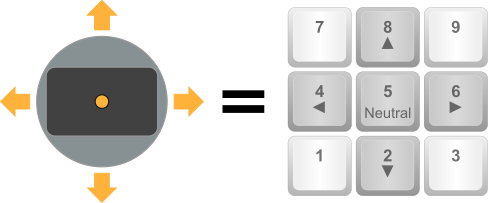
To move the left stick, use numeric keyboard as shown below.
To move the right stick, use Control key + numeric keyboard as shown below.
To simplify, currently the steps are set to 20% (0, 20, 40, 60, 80, 100).
To toggle switch A, just press A. The switch A takes successively its possible physical. positions. Here is an example of how it works:

Same operation for all the other switches (A, B, C, ... I, J)
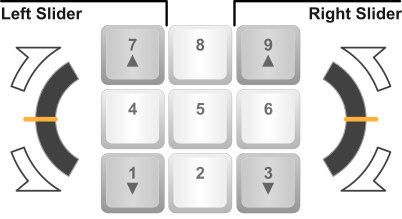
To move left slider or right slider, use numeric keyboard as shown below.
To move knob P1 or knob P2, use Control key + numeric keyboard as shown below.
To simplify, currently the steps are set to 20% (0, 20, 40, 60, 80, 100).
Note : No command is provided for knob P3. There no key to set slider or knob to neutral.
Have fun!
written by Ceeb182