


TensorFlow Extended (TFX) is a Google-production-scale machine learning platform based on TensorFlow. It provides a configuration framework to express ML pipelines consisting of TFX components. TFX pipelines can be orchestrated using Apache Airflow and Kubeflow Pipelines. Both the components themselves as well as the integrations with orchestration systems can be extended.
TFX components interact with a ML Metadata backend that keeps a record of component runs, input and output artifacts, and runtime configuration. This metadata backend enables advanced functionality like experiment tracking or warmstarting/resuming ML models from previous runs.
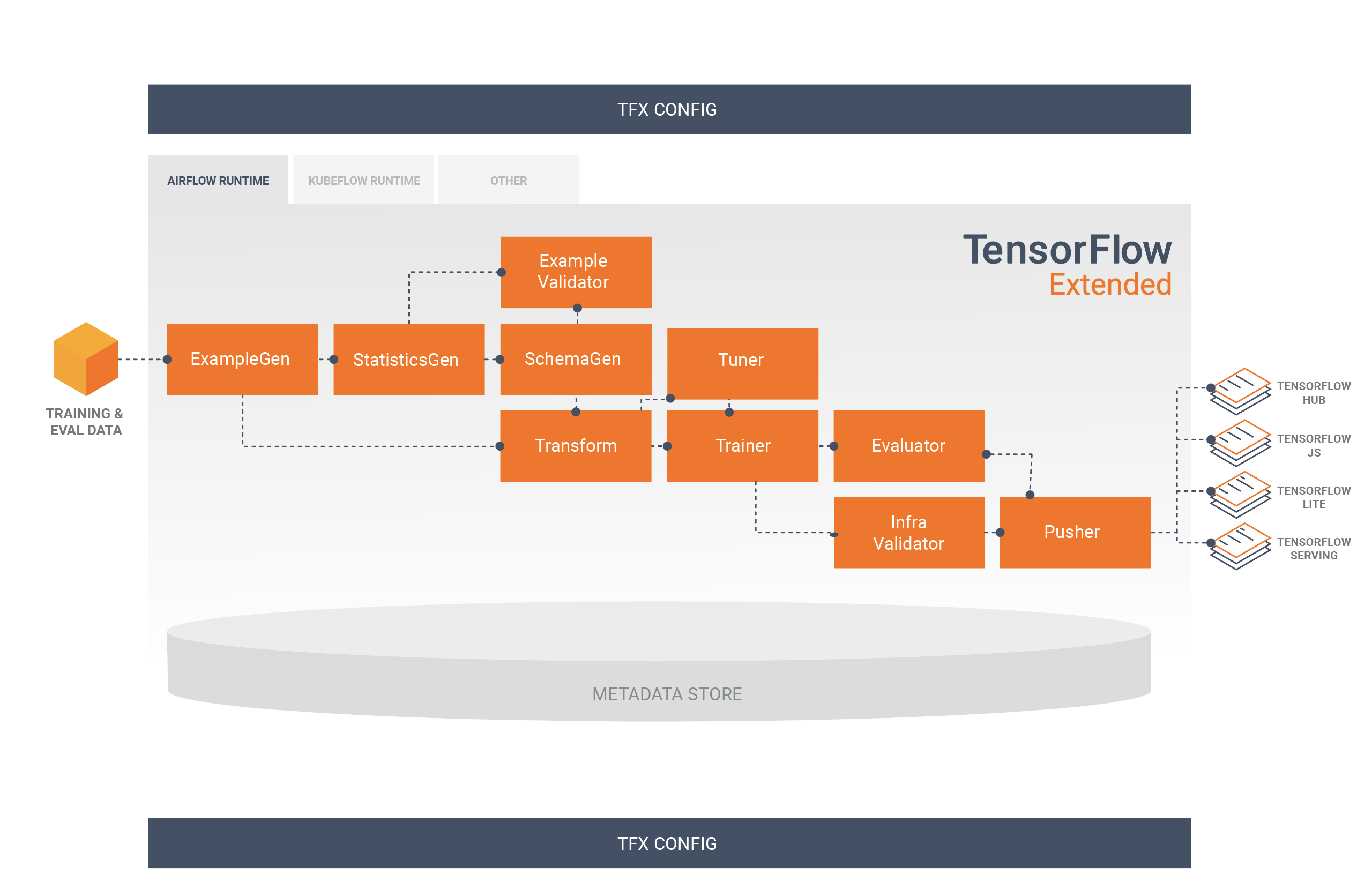
Please see the TFX User Guide.
The TFX Roadmap, which is updated quarterly.
For detailed previous and upcoming changes, please check here
TFX is an open-source project and we strongly encourage active participation by the ML community in helping to shape TFX to meet or exceed their needs. An important component of that effort is the RFC process. Please see the listing of current and past TFX RFCs. Please see the TensorFlow Request for Comments (TF-RFC) process page for information on how community members can contribute.
The following table describes how the tfx package versions are compatible with
its major dependency PyPI packages. This is determined by our testing framework,
but other untested combinations may also work.
| tfx | Python | apache-beam[gcp] | ml-metadata | pyarrow | tensorflow | tensorflow-data-validation | tensorflow-metadata | tensorflow-model-analysis | tensorflow-serving-api | tensorflow-transform | tfx-bsl |
|---|---|---|---|---|---|---|---|---|---|---|---|
| GitHub master | >=3.9,<3.11 | 2.59.0 | 1.17.1 | 10.0.1 | nightly (2.x) | 1.17.0 | 1.17.1 | 0.48.0 | 2.17.1 | 1.17.0 | 1.17.1 |
| 1.17.2 | >=3.9,<3.11 | 2.59.0 | 1.17.1 | 10.0.1 | 2.17 | 1.17.0 | 1.17.1 | 0.48.0 | 2.17.1 | 1.17.0 | 1.17.1 |
| 1.17.1 | >=3.9,<3.11 | 2.59.0 | 1.17.1 | 10.0.1 | 2.17 | 1.17.0 | 1.17.1 | 0.48.0 | 2.17.1 | 1.17.0 | 1.17.1 |
| 1.17.0 | >=3.9,<3.11 | 2.59.0 | 1.17.1 | 10.0.1 | 2.17 | 1.17.0 | 1.17.1 | 0.48.0 | 2.17.1 | 1.17.0 | 1.17.1 |
| 1.16.0 | >=3.9,<3.11 | 2.59.0 | 1.16.0 | 10.0.1 | 2.16 | 1.16.1 | 1.16.1 | 0.47.0 | 2.16.1 | 1.16.0 | 1.16.1 |
| 1.15.0 | >=3.9,<3.11 | 2.47.0 | 1.15.0 | 10.0.0 | 2.15 | 1.15.1 | 1.15.0 | 0.46.0 | 2.15.1 | 1.15.0 | 1.15.1 |
| 1.14.0 | >=3.8,<3.11 | 2.47.0 | 1.14.0 | 10.0.0 | 2.13 | 1.14.0 | 1.14.0 | 0.45.0 | 2.9.0 | 1.14.0 | 1.14.0 |
| 1.13.0 | >=3.8,<3.10 | 2.40.0 | 1.13.1 | 6.0.0 | 2.12 | 1.13.0 | 1.13.1 | 0.44.0 | 2.9.0 | 1.13.0 | 1.13.0 |
| 1.12.0 | >=3.7,<3.10 | 2.40.0 | 1.12.0 | 6.0.0 | 2.11 | 1.12.0 | 1.12.0 | 0.43.0 | 2.9.0 | 1.12.0 | 1.12.0 |
| 1.11.0 | >=3.7,<3.10 | 2.40.0 | 1.11.0 | 6.0.0 | 1.15.5 / 2.10.0 | 1.11.0 | 1.11.0 | 0.42.0 | 2.9.0 | 1.11.0 | 1.11.0 |
| 1.10.0 | >=3.7,<3.10 | 2.40.0 | 1.10.0 | 6.0.0 | 1.15.5 / 2.9.0 | 1.10.0 | 1.10.0 | 0.41.0 | 2.9.0 | 1.10.0 | 1.10.0 |
| 1.9.0 | >=3.7,<3.10 | 2.38.0 | 1.9.0 | 5.0.0 | 1.15.5 / 2.9.0 | 1.9.0 | 1.9.0 | 0.40.0 | 2.9.0 | 1.9.0 | 1.9.0 |
| 1.8.0 | >=3.7,<3.10 | 2.38.0 | 1.8.0 | 5.0.0 | 1.15.5 / 2.8.0 | 1.8.0 | 1.8.0 | 0.39.0 | 2.8.0 | 1.8.0 | 1.8.0 |
| 1.7.0 | >=3.7,<3.9 | 2.36.0 | 1.7.0 | 5.0.0 | 1.15.5 / 2.8.0 | 1.7.0 | 1.7.0 | 0.38.0 | 2.8.0 | 1.7.0 | 1.7.0 |
| 1.6.2 | >=3.7,<3.9 | 2.35.0 | 1.6.0 | 5.0.0 | 1.15.5 / 2.8.0 | 1.6.0 | 1.6.0 | 0.37.0 | 2.7.0 | 1.6.0 | 1.6.0 |
| 1.6.0 | >=3.7,<3.9 | 2.35.0 | 1.6.0 | 5.0.0 | 1.15.5 / 2.7.0 | 1.6.0 | 1.6.0 | 0.37.0 | 2.7.0 | 1.6.0 | 1.6.0 |
| 1.5.0 | >=3.7,<3.9 | 2.34.0 | 1.5.0 | 5.0.0 | 1.15.2 / 2.7.0 | 1.5.0 | 1.5.0 | 0.36.0 | 2.7.0 | 1.5.0 | 1.5.0 |
| 1.4.0 | >=3.7,<3.9 | 2.33.0 | 1.4.0 | 5.0.0 | 1.15.0 / 2.6.0 | 1.4.0 | 1.4.0 | 0.35.0 | 2.6.0 | 1.4.0 | 1.4.0 |
| 1.3.4 | >=3.6,<3.9 | 2.32.0 | 1.3.0 | 2.0.0 | 1.15.0 / 2.6.0 | 1.3.0 | 1.2.0 | 0.34.1 | 2.6.0 | 1.3.0 | 1.3.0 |
| 1.3.3 | >=3.6,<3.9 | 2.32.0 | 1.3.0 | 2.0.0 | 1.15.0 / 2.6.0 | 1.3.0 | 1.2.0 | 0.34.1 | 2.6.0 | 1.3.0 | 1.3.0 |
| 1.3.2 | >=3.6,<3.9 | 2.32.0 | 1.3.0 | 2.0.0 | 1.15.0 / 2.6.0 | 1.3.0 | 1.2.0 | 0.34.1 | 2.6.0 | 1.3.0 | 1.3.0 |
| 1.3.1 | >=3.6,<3.9 | 2.32.0 | 1.3.0 | 2.0.0 | 1.15.0 / 2.6.0 | 1.3.0 | 1.2.0 | 0.34.1 | 2.6.0 | 1.3.0 | 1.3.0 |
| 1.3.0 | >=3.6,<3.9 | 2.32.0 | 1.3.0 | 2.0.0 | 1.15.0 / 2.6.0 | 1.3.0 | 1.2.0 | 0.34.1 | 2.6.0 | 1.3.0 | 1.3.0 |
| 1.2.1 | >=3.6,<3.9 | 2.31.0 | 1.2.0 | 2.0.0 | 1.15.0 / 2.5.0 | 1.2.0 | 1.2.0 | 0.33.0 | 2.5.1 | 1.2.0 | 1.2.0 |
| 1.2.0 | >=3.6,<3.9 | 2.31.0 | 1.2.0 | 2.0.0 | 1.15.0 / 2.5.0 | 1.2.0 | 1.2.0 | 0.33.0 | 2.5.1 | 1.2.0 | 1.2.0 |
| 1.0.0 | >=3.6,<3.9 | 2.29.0 | 1.0.0 | 2.0.0 | 1.15.0 / 2.5.0 | 1.0.0 | 1.0.0 | 0.31.0 | 2.5.1 | 1.0.0 | 1.0.0 |
| 0.30.0 | >=3.6,<3.9 | 2.28.0 | 0.30.0 | 2.0.0 | 1.15.0 / 2.4.0 | 0.30.0 | 0.30.0 | 0.30.0 | 2.4.0 | 0.30.0 | 0.30.0 |
| 0.29.0 | >=3.6,<3.9 | 2.28.0 | 0.29.0 | 2.0.0 | 1.15.0 / 2.4.0 | 0.29.0 | 0.29.0 | 0.29.0 | 2.4.0 | 0.29.0 | 0.29.0 |
| 0.28.0 | >=3.6,<3.9 | 2.28.0 | 0.28.0 | 2.0.0 | 1.15.0 / 2.4.0 | 0.28.0 | 0.28.0 | 0.28.0 | 2.4.0 | 0.28.0 | 0.28.1 |
| 0.27.0 | >=3.6,<3.9 | 2.27.0 | 0.27.0 | 2.0.0 | 1.15.0 / 2.4.0 | 0.27.0 | 0.27.0 | 0.27.0 | 2.4.0 | 0.27.0 | 0.27.0 |
| 0.26.4 | >=3.6,<3.9 | 2.28.0 | 0.26.0 | 0.17.0 | 1.15.0 / 2.3.0 | 0.26.1 | 0.26.0 | 0.26.0 | 2.3.0 | 0.26.0 | 0.26.0 |
| 0.26.3 | >=3.6,<3.9 | 2.25.0 | 0.26.0 | 0.17.0 | 1.15.0 / 2.3.0 | 0.26.0 | 0.26.0 | 0.26.0 | 2.3.0 | 0.26.0 | 0.26.0 |
| 0.26.1 | >=3.6,<3.9 | 2.25.0 | 0.26.0 | 0.17.0 | 1.15.0 / 2.3.0 | 0.26.0 | 0.26.0 | 0.26.0 | 2.3.0 | 0.26.0 | 0.26.0 |
| 0.26.0 | >=3.6,<3.9 | 2.25.0 | 0.26.0 | 0.17.0 | 1.15.0 / 2.3.0 | 0.26.0 | 0.26.0 | 0.26.0 | 2.3.0 | 0.26.0 | 0.26.0 |
| 0.25.0 | >=3.6,<3.9 | 2.25.0 | 0.24.0 | 0.17.0 | 1.15.0 / 2.3.0 | 0.25.0 | 0.25.0 | 0.25.0 | 2.3.0 | 0.25.0 | 0.25.0 |
| 0.24.1 | >=3.6,<3.9 | 2.24.0 | 0.24.0 | 0.17.0 | 1.15.0 / 2.3.0 | 0.24.1 | 0.24.0 | 0.24.3 | 2.3.0 | 0.24.1 | 0.24.1 |
| 0.24.0 | >=3.6,<3.9 | 2.24.0 | 0.24.0 | 0.17.0 | 1.15.0 / 2.3.0 | 0.24.1 | 0.24.0 | 0.24.3 | 2.3.0 | 0.24.1 | 0.24.1 |
| 0.23.1 | >=3.5,<4 | 2.24.0 | 0.23.0 | 0.17.0 | 1.15.0 / 2.3.0 | 0.23.1 | 0.23.0 | 0.23.0 | 2.3.0 | 0.23.0 | 0.23.0 |
| 0.23.0 | >=3.5,<4 | 2.23.0 | 0.23.0 | 0.17.0 | 1.15.0 / 2.3.0 | 0.23.0 | 0.23.0 | 0.23.0 | 2.3.0 | 0.23.0 | 0.23.0 |
| 0.22.2 | >=3.5,<4 | 2.21.0 | 0.22.1 | 0.16.0 | 1.15.0 / 2.2.0 | 0.22.2 | 0.22.2 | 0.22.2 | 2.2.0 | 0.22.0 | 0.22.1 |
| 0.22.1 | >=3.5,<4 | 2.21.0 | 0.22.1 | 0.16.0 | 1.15.0 / 2.2.0 | 0.22.2 | 0.22.2 | 0.22.2 | 2.2.0 | 0.22.0 | 0.22.1 |
| 0.22.0 | >=3.5,<4 | 2.21.0 | 0.22.0 | 0.16.0 | 1.15.0 / 2.2.0 | 0.22.0 | 0.22.0 | 0.22.1 | 2.2.0 | 0.22.0 | 0.22.0 |
| 0.21.5 | >=2.7,<3 or >=3.5,<4 | 2.17.0 | 0.21.2 | 0.15.0 | 1.15.0 / 2.1.0 | 0.21.5 | 0.21.1 | 0.21.5 | 2.1.0 | 0.21.2 | 0.21.4 |
| 0.21.4 | >=2.7,<3 or >=3.5,<4 | 2.17.0 | 0.21.2 | 0.15.0 | 1.15.0 / 2.1.0 | 0.21.5 | 0.21.1 | 0.21.5 | 2.1.0 | 0.21.2 | 0.21.4 |
| 0.21.3 | >=2.7,<3 or >=3.5,<4 | 2.17.0 | 0.21.2 | 0.15.0 | 1.15.0 / 2.1.0 | 0.21.5 | 0.21.1 | 0.21.5 | 2.1.0 | 0.21.2 | 0.21.4 |
| 0.21.2 | >=2.7,<3 or >=3.5,<4 | 2.17.0 | 0.21.2 | 0.15.0 | 1.15.0 / 2.1.0 | 0.21.5 | 0.21.1 | 0.21.5 | 2.1.0 | 0.21.2 | 0.21.4 |
| 0.21.1 | >=2.7,<3 or >=3.5,<4 | 2.17.0 | 0.21.2 | 0.15.0 | 1.15.0 / 2.1.0 | 0.21.4 | 0.21.1 | 0.21.4 | 2.1.0 | 0.21.2 | 0.21.3 |
| 0.21.0 | >=2.7,<3 or >=3.5,<4 | 2.17.0 | 0.21.0 | 0.15.0 | 1.15.0 / 2.1.0 | 0.21.0 | 0.21.0 | 0.21.1 | 2.1.0 | 0.21.0 | 0.21.0 |
| 0.15.0 | >=2.7,<3 or >=3.5,<4 | 2.16.0 | 0.15.0 | 0.15.0 | 1.15.0 | 0.15.0 | 0.15.0 | 0.15.2 | 1.15.0 | 0.15.0 | 0.15.1 |
| 0.14.0 | >=2.7,<3 or >=3.5,<4 | 2.14.0 | 0.14.0 | 0.14.0 | 1.14.0 | 0.14.1 | 0.14.0 | 0.14.0 | 1.14.0 | 0.14.0 | n/a |
| 0.13.0 | >=2.7,<3 or >=3.5,<4 | 2.12.0 | 0.13.2 | n/a | 1.13.1 | 0.13.1 | 0.13.0 | 0.13.2 | 1.13.0 | 0.13.0 | n/a |
| 0.12.0 | >=2.7,<3 | 2.10.0 | 0.13.2 | n/a | 1.12.0 | 0.12.0 | 0.12.1 | 0.12.1 | 1.12.0 | 0.12.0 | n/a |
Before releasing, you need to set up the PyPI environment and token once:
Step 1: Create PyPI environment
Create a new environment named pypi in the GitHub repository:
- Go to https://github.com/tensorflow/tfx/settings/environments/new
- Name it
pypi - Click "Configure environment"
Step 2: Add PYPI_TOKEN secret
Add your PyPI token to the pypi environment:
- In the
pypienvironment settings, scroll to "Environment secrets" - Click "Add secret"
- Name:
PYPI_TOKEN(use this exact name) - Value: Your PyPI API token
- Click "Add secret"
Step 3: Commit and push your release branch
Ensure your release branch has the correct version set in tfx/version.py, then:
git add tfx/version.py
git commit -m "Prepare release vX.Y.Z"
git push origin your-release-branchBefore triggering any release workflow, complete all of the following:
-
Make sure CI jobs are all green on your release branch.
-
Run Vertex ML pipeline tests and confirm they are all passing:
export image_repo="gcr.io/tfx-testing/ai-platform-pipelines-e2e-test"
export image_tag="$(date +%s)-$(LC_ALL=C tr -dc a-z0-9 </dev/urandom | head -c 10)"
export image_name="${image_repo}:${image_tag}"
export KFP_E2E_SRC="$(pwd)"
export KFP_E2E_GCP_PROJECT_ID=tfx-testing
export KFP_E2E_GCP_REGION=us-central1
export KFP_E2E_BASE_CONTAINER_IMAGE="${image_name}"
export KFP_E2E_BUCKET_NAME="tfx-testing-bucket"
export KFP_E2E_TEST_DATA_ROOT="$(pwd)/tfx/components/testdata"
export CAIP_E2E_DATA_BUCKET="tfx-testing-sample-data"
export CAIP_TRAINING_COMPONENT_TEST_IMAGE="gcr.io/tfx-testing/caip-training:tfx-test"
gcloud config set project "${KFP_E2E_GCP_PROJECT_ID}"

export MY_BASE_IMAGE="gcr.io/tfx-oss-public/tfx_base:py310-20260316"
export MY_BEAM_VERSION="2.50.0"

TFX_DEPENDENCY_SELECTOR=DEFAULT DOCKER_IMAGE_REPO="${image_repo}" DOCKER_IMAGE_TAG="${image_tag}" tfx/tools/docker/build_docker_image.sh --build-arg BASE_IMAGE="${MY_BASE_IMAGE}" --build-arg BEAM_VERSION="${MY_BEAM_VERSION}" --no-cache

docker inspect "${image_name}"
docker push "${image_name}"

pytest \
    tfx/experimental/templates/taxi/e2e_tests/vertex_e2e_test.py \
    tfx/tools/cli/handler/vertex_handler_test.py \
tfx/orchestration/kubeflow/v2- Verify test runs in Vertex AI Pipelines:
- https://console.cloud.google.com/vertex-ai/pipelines/runs?project=tfx-testing
- You must have access to this project and URL to complete release validation.
- Review the security scan report and confirm the vulnerability count satisfies release requirements for the branch/release context. This check is subjective and should be approved by the release owner based on severity, exploitability, and risk acceptance.
This method allows you to manually trigger a release from any branch without creating a GitHub release.
Steps (after completing setup and pre-release checks above):
- Navigate to the GitHub Actions page: https://github.com/tensorflow/tfx/actions
- Find and select the
Build Wheels & Publish to PyPIworkflow: https://github.com/tensorflow/tfx/actions/workflows/wheels.yml - Click the "Run workflow" dropdown button.
- Select your release branch from the dropdown menu.
- Click "Run workflow".
The workflow will build wheels for all supported Python versions and automatically upload them to PyPI.
This method creates a formal GitHub release with a tag, which automatically triggers the build and upload workflow.
Steps (after completing setup and pre-release checks above):
- Go to the Releases tab: https://github.com/tensorflow/tfx/releases
- Click the
Draft new releasebutton (you'll be redirected to https://github.com/tensorflow/tfx/releases/new) - Click the
Choose a tag/Select tagbutton and create a new tag for your release (e.g.,v1.18.0) - Click the
Targetdropdown and select your release branch - Fill in the Release title and Release notes sections
- Choose the release type:
- Check
Set as a pre-releaseif this is a beta/test release - Leave unchecked for
Set as the latest releasefor stable releases
- Check
- Click the
Publish releasebutton - Verify the workflow is running by going to the Actions workflow page: https://github.com/tensorflow/tfx/actions/workflows/wheels.yml
The Build Wheels & Publish to PyPI workflow will automatically trigger and build/upload artifacts to PyPI.