Tag it. Filter it. Split it. Clip it. Forge it.
tags → search → stems → soundboards · with Electron and Vue





Most file browsers are optimized for documents — not creative assets.
ForgeAudio is built specifically for large audio libraries:
- ⚡ Instant, composable filtering across thousands of files
- 🏷 Portable tag + description metadata (one JSON file, no database)
- 🎛 Soundboards with waveform-based clip regions
- 🎸 AI stem separation (Demucs) built in
- 🚫 No cloud. No telemetry. No bloat.
- 🎨 Customizable theme engine
Designed for sound designers, musicians, streamers, and developers who need speed and control.
| Library + right-click menu | Soundboard clip editor (waveform) |
|---|---|
|
 |
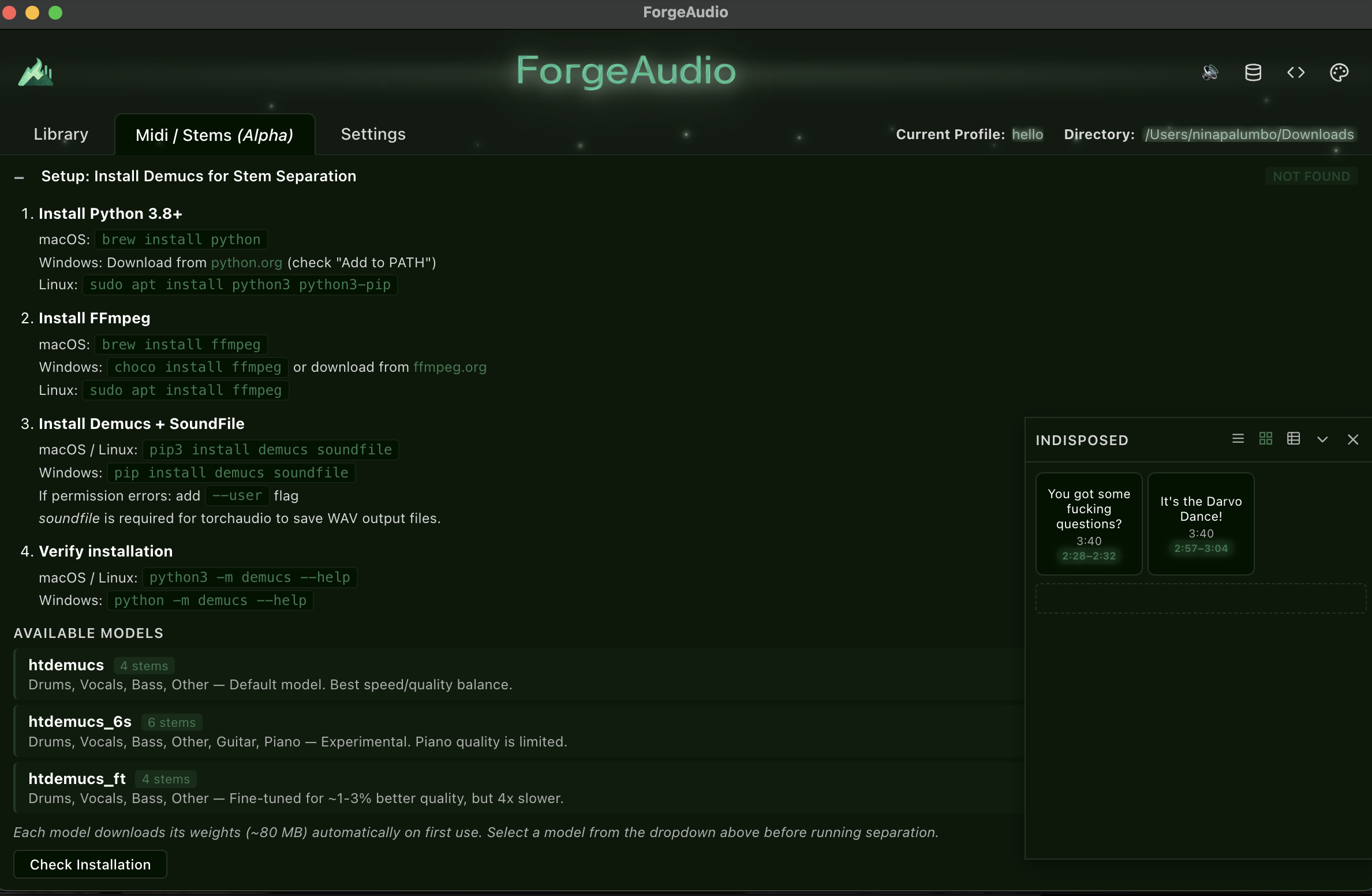
| Soundboard drawer + docked pads | Demucs setup + model reference |
|---|---|
 |
 |
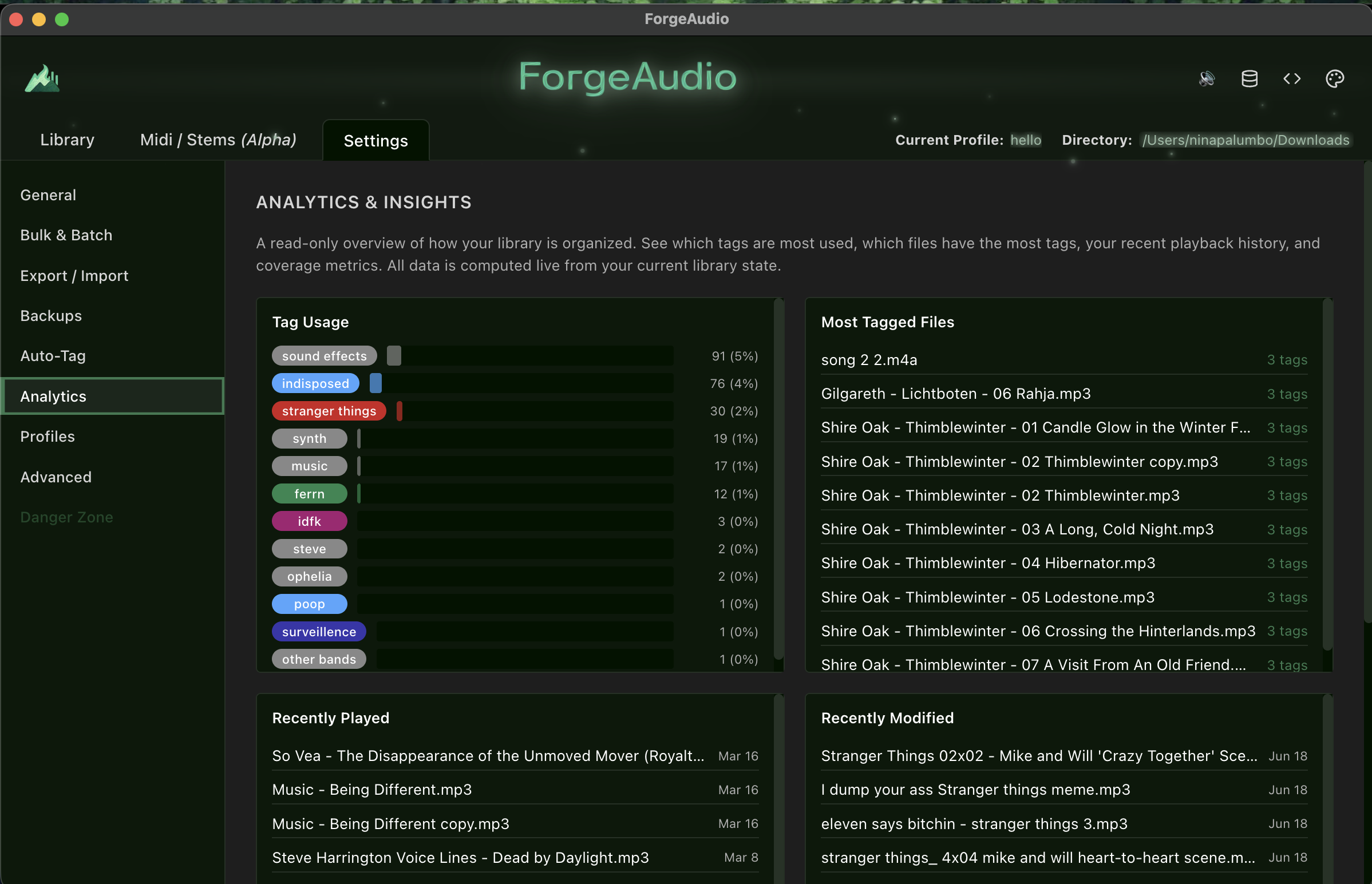
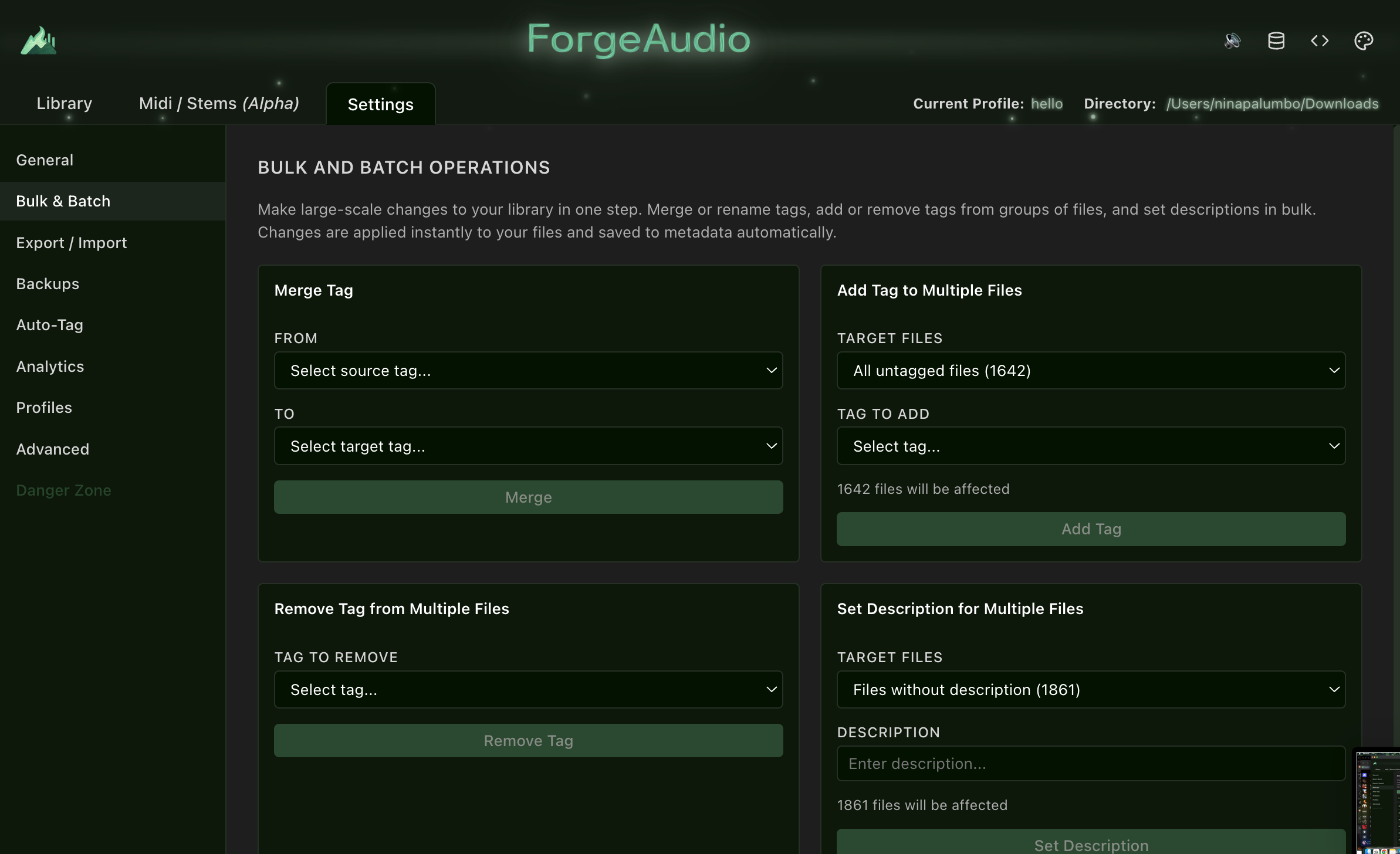
| Analytics & Insights | Bulk & Batch Operations |
|---|---|
 |
 |
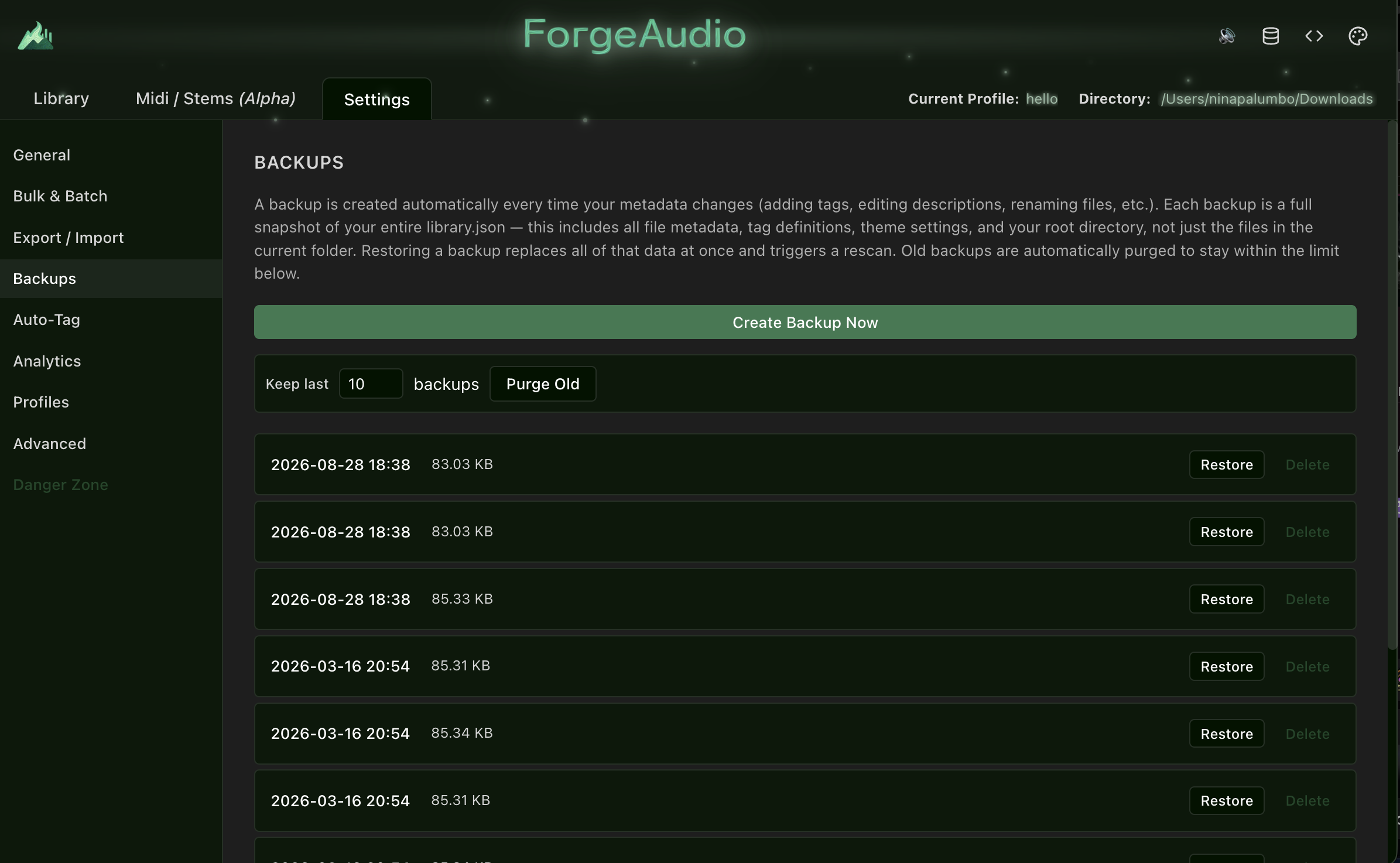
| Automatic backups | Tag Store Debug Viewer |
|---|---|
 |
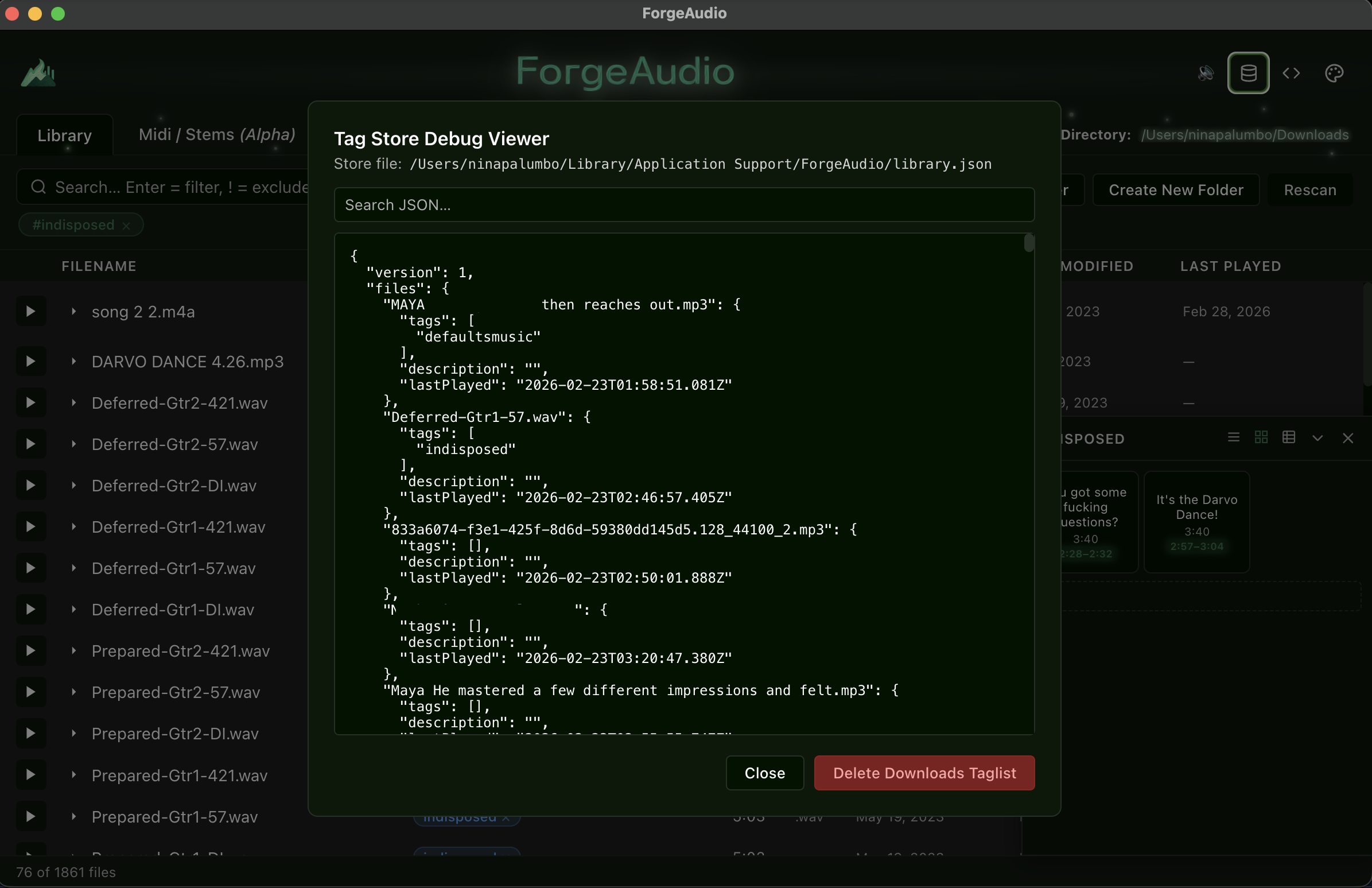 |
- Parallel recursive scanning — breadth-parallel directory traversal with batched
stat()calls;.forgeaudio/and other dot-directories skipped - Streaming results — batches of 50 stream to the renderer; the list populates while the scan runs
- Resizable columns — Filename (+ description), Tags, Duration, Type, Date Created, Date Modified, Last Played
- Expandable row detail — chevron reveals path, size, duration, format, tags, description, and all dates
- Live footer —
X of Y files · N selected - Scan overlay with a smart timer for large directories; Rescan and Change Folder buttons
- Create New Folder from the empty state — creates a directory on disk and sets it as the library root
- Drag-and-drop import — drop files or folders from Finder/Explorer; audio is copied into the library root, non-audio skipped, filename conflicts resolved via a step-through modal (overwrite / keep both / apply-to-all)
Everything is a chip. Chips combine with AND semantics and are shown under the search bar with individual × and a Clear all button (Escape also clears).
| Syntax | Result |
|---|---|
kick + Enter |
Description/filename chip |
!kick |
Exclude description/filename |
#drums |
Tag chip (autocomplete dropdown, arrow keys + Enter) |
!#drums |
Exclude tag |
#uncategorized |
Virtual tag: only files with zero tags (!#uncategorized hides them) |
$date |
Date filter dropdown → created / modified / last played × on / before / after |
- Format filter — multi-select dropdown (.wav / .mp3 / .aiff / .flac / .ogg / .m4a)
- Date filters — right-click any date cell (or the detail panel) for a 9-item menu; UTC calendar-day comparison
- Click a tag pill in any row to filter by it
- Filter help —
?icon opens the syntax reference - Filter state is saved per profile
- Full copy / paste / cut / select-all support in every text input via the application Edit menu
- Click a row or its play button; bottom player bar with play/pause, filled-progress scrubber, loop toggle, current / total time
- Spacebar toggles playback globally
- Pointer scrubbing with drag isolation (timeupdate never snaps the handle back), click-to-seek, keyboard arrow seeking
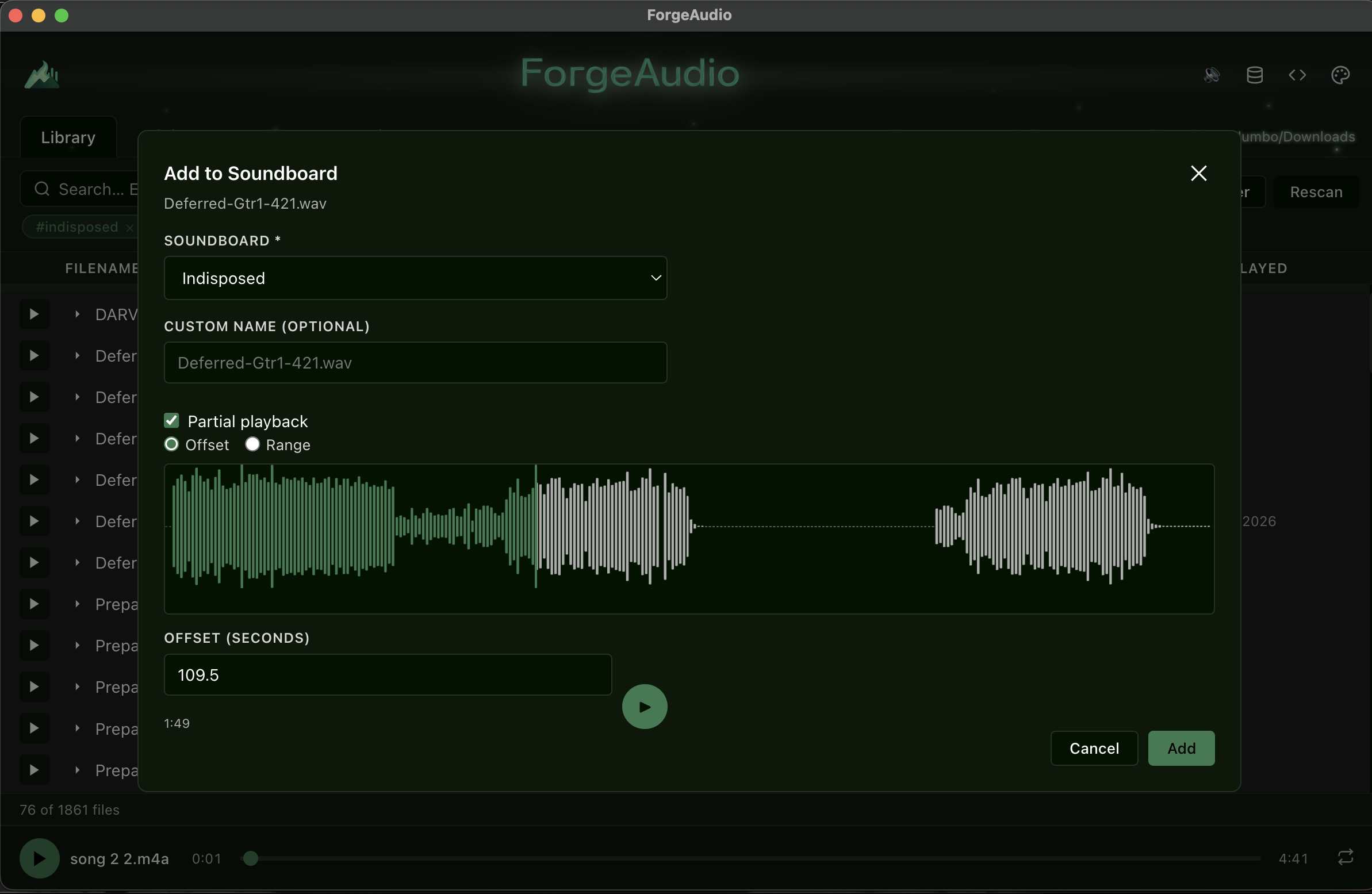
- Partial playback — offset or range constraints from soundboard items; restart returns to the intended start
- Custom
atom://protocol streams local files with Range-request support (M4A seeking works) - Windows path normalization for drive letters
- Color-coded tag pills; click to filter,
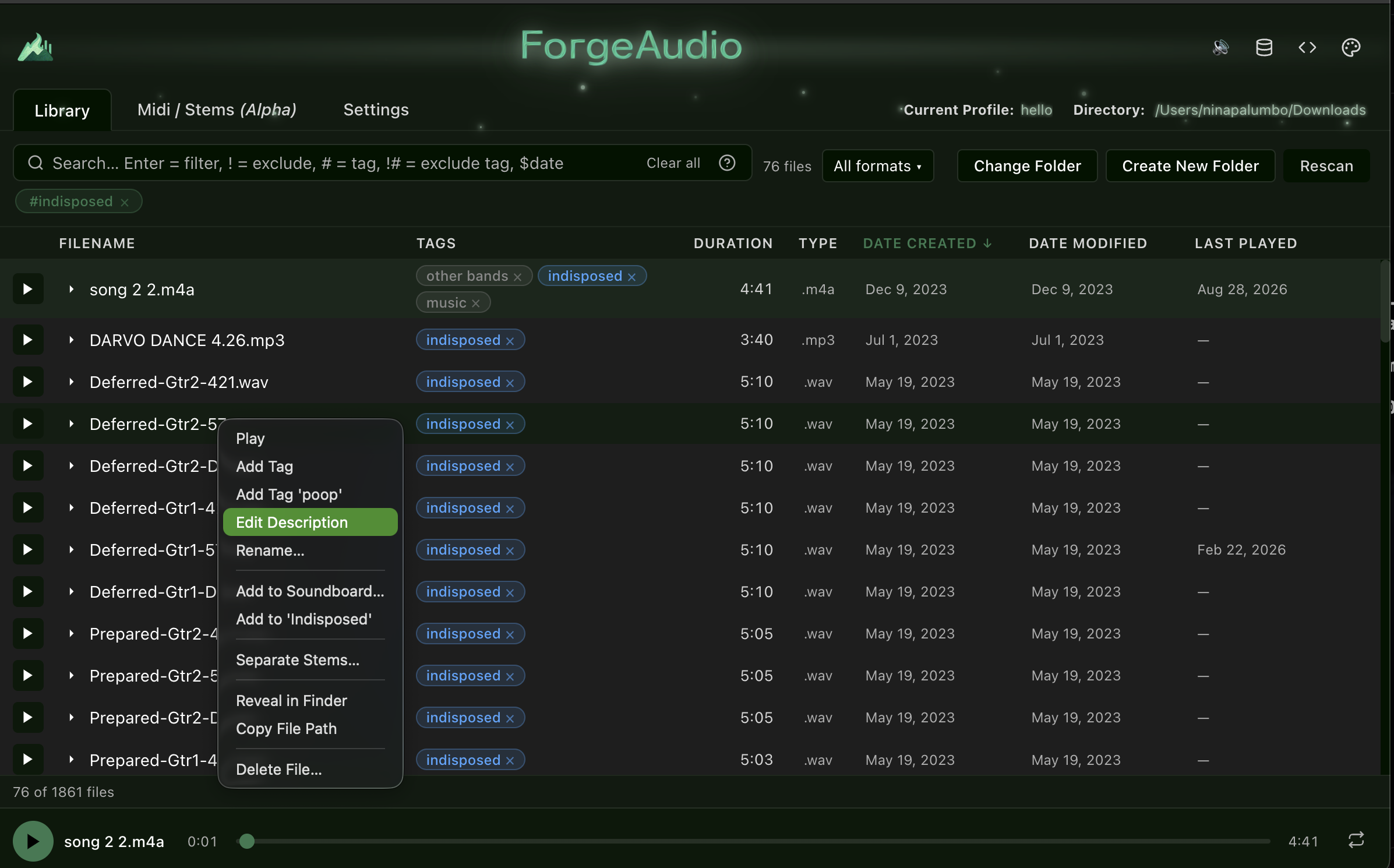
×to remove from a file - Right-click context menu: Play · Add Tag · Add Tag
'<last used>'(quick-tag) · Edit Description · Rename (duplicate-name validation, scrolls to result) · Add to Soundboard… · Add to'<recent board>'· Separate Stems… · Reveal in Finder · Copy File Path · Delete File… - Multi-select — Shift-click range, Cmd/Ctrl-click toggle; bulk menu (Add Tag to Selected, quick-tag Selected, Delete Selected); multi-file native drag to Finder or soundboards
- Metadata lives in a single portable
library.jsonkeyed by filename, so folders can move without losing tags
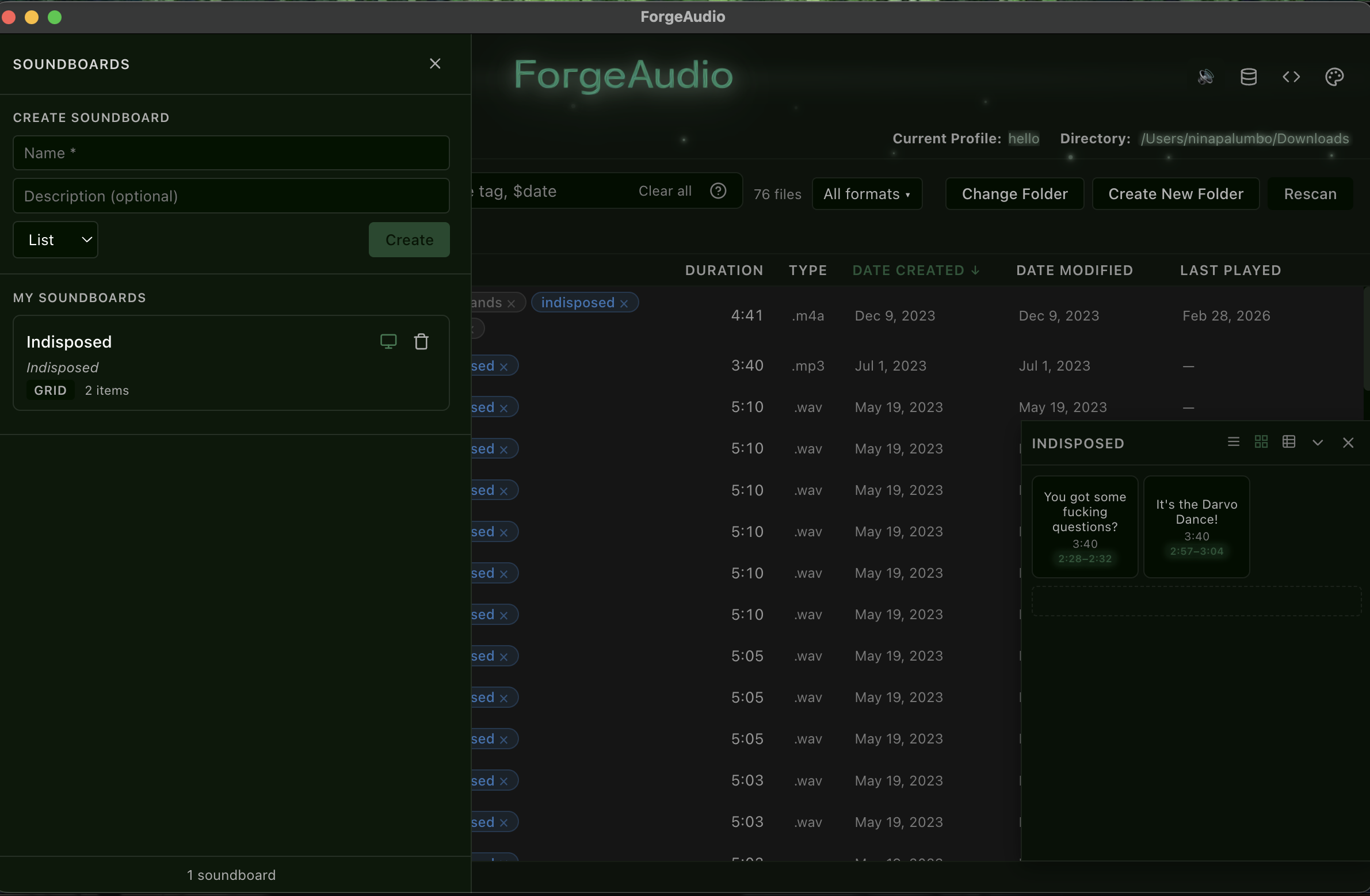
- Drawer (left side) to create soundboards per profile with name, description, and LIST / GRID / TABLE layout; click the layout label to cycle; enable/disable docking; delete
- Docked panels (bottom-right) — resizable, collapsible, per-board width/height persisted; header toggle for LIST / GRID / TABLE; aggregated tag pills of referenced files
- Add items via context menu (modal or quick-add), drag-and-drop from the library, or from separated stems
- Waveform clip editor — Add / Edit modals render the file with wavesurfer.js; drag a marker (offset) or region (range) directly on the waveform, with numeric inputs, MM:SS hints and preview playback
- Partial playback badges (
2:26–2:32) with accent glow on pads and rows - Item context menu — Play · View Data (file path/format/size/tags/description + item settings) · Edit… · Remove
- Drag-to-reorder in every layout, including a drop-end zone
- Grid: 1–8 columns via right-click radio menu. Table: hideable Duration / Offset / Range columns
- Everything persists in
library.jsonand is included in profile snapshots
Right-click any file → Separate Stems… to run Meta's Demucs locally.
| Model | Stems | Notes |
|---|---|---|
htdemucs |
drums, vocals, bass, other | Default — best speed/quality balance |
htdemucs_6s |
+ guitar, piano | Experimental piano quality |
htdemucs_ft |
drums, vocals, bass, other | ~1–3 % better, ~4× slower |
- Model selector on the Midi / Stems tab; streaming progress banner with cancel
- Output in
<library>/.forgeaudio/stems/<model>/<track>/; different models coexist - Stems grouped per source track with a model badge; play/pause per stem
- Group menu: Export Group · Delete Group. Stem menu: Play · Add to Soundboard… · quick-add · Export Stem · Reveal in Finder · Delete Stem
- Setup panel with OS-specific install steps, model reference cards, and Check Installation
# macOS
brew install python ffmpeg
pip3 install demucs soundfile
python3 -m demucs --help   # verify
Windows: install Python from python.org (add to PATH), choco install ffmpeg, pip install demucs soundfile. Linux: sudo apt install python3 python3-pip ffmpeg. Model weights (~80 MB) download on first use.
- Palette icon in the header; pick one source color and a full theme is derived with chroma-js, or edit Accent / Background / Text / Danger / Success manually
- Saved into
library.json; Reset restores defaults - Optional boot splash (toggle in Advanced settings)
| Panel | What it does |
|---|---|
| General | Library root folder, tag manager (color pickers, rename, delete, add), library statistics |
| Bulk & Batch | Merge tags, add/remove a tag across groups of files (all, untagged, by tag, by extension), set descriptions in bulk |
| Export / Import | Export and import metadata as JSON |
| Backups | Automatic snapshot of library.json on every metadata change; Create Backup Now, restore, keep-last-N with purge |
| Auto-Tag | Rules by filename substring, regex, or extension with live preview before applying |
| Analytics | Tag usage distribution, most-tagged files, recently played / modified, coverage metrics |
| Profiles | Create / switch / delete / rename; export and import as .forgerc |
| Advanced | Scanner batch size, duration worker count, developer mode, boot splash, UI toggles |
| Danger Zone | Double-confirm clear tags, delete definitions, reset metadata |
Keyboard: Cmd+, opens Settings, Cmd+1/2 switch views, F12 toggles DevTools. All modals carry ARIA dialog attributes.
- Full snapshots of files, tags, theme, settings, filters, soundboards and root directory
- Same directory → instant switch; different directory → automatic rescan
- Default profile auto-saved on first custom profile; active profile shown in the header
- Tag Store Debug Viewer (database icon) — shows the
library.jsonpath with a searchable, recursively filtered JSON view; delete the tag list for the current folder - DevTools toggle (
</>icon) — off by default, alsoF12in production builds
- Parallel file system traversal, incremental streaming population
- 8-worker concurrent duration extraction
- O(n) pure-computed filtering; the master file array is never mutated by filters
- No UI thread blocking — tested with libraries of thousands of files
Main Process (Electron)
│
├── Scanner   (parallel FS traversal, streamed in batches)
├── Metadata  (library.json I/O)
├── AudioInfo (music-metadata duration extraction)
├── Stems     (Demucs subprocess, progress parsing, export)
├── atom://   (custom protocol with Range support)
└── Native menus (context menus, application Edit menu)
        │  IPC (contextBridge)
Renderer (Vue 3)
│
├── libraryStore    files, filters, playback, profiles, stems, selection
├── tagStore        tag definitions + colors
├── soundboardStore soundboards + items (pure CRUD)
├── themeStore      CSS variables
└── settingsStore   settings persistence
- The renderer never touches the filesystem — everything goes through IPC
- Stores are composable singletons (module-scope refs) — no Pinia
- Metadata keyed by filename for portability
| Electron | Desktop shell, IPC, file system access |
| Vue 3 | Composition API + <script setup> |
| Vite | Fast dev server + build tooling |
| Vue Composables | Singleton store pattern (no Pinia) |
| music-metadata | Audio duration extraction |
| wavesurfer.js | Waveform rendering + regions |
| chroma-js | Color math for theme generation |
| Demucs | AI stem separation (Python subprocess) |
| TypeScript | Strict typing throughout |
| Vitest | 982 unit tests across 46 files |
982 unit tests across 46 files cover:
- Store logic (library, tag, theme, settings, soundboard)
- Filtering edge cases (tag/description/date AND, excludes,
#uncategorized) - Metadata persistence and partial-scan tag preservation
- Profiles (create, switch, delete, rename, export/import, filter state)
- Soundboards (CRUD, reorder, uniqueId, waveform timeline, item data modal, drawer, docked panels)
- Stem separation (model switching, IPC, progress/complete/error, delete, export)
- Multi-select and bulk operations, date filters, drag-and-drop import + conflicts
- Modal rendering and ARIA compliance
Prerequisites: Node.js 18+, npm 9+ (Python 3.8+ / ffmpeg / demucs only for stem separation).
npm install            # install
npm run dev            # Vite + Electron with hot reload
npm run electron:build # production build (electron-builder)
npm test # Vitestelectron/
├── main.ts window, IPC handlers, atom:// scheme, native menus
├── preload.ts contextBridge → electronAPI
└── ipc/ scanner, metadata, audioInfo, stems
src/
├── App.vue header, nav tabs, Player, BootSplash
├── views/ LibraryView, MidiView, SettingsView (+ settings/ panels)
├── components/ SearchBar, AudioList/Row, Player, WaveformTimeline,
│ soundboard views + drawer + dock, ~20 BaseModal-based modals
├── stores/ libraryStore, tagStore, soundboardStore, themeStore, settingsStore
└── utils/ formatBytes, formatSeconds, formatDateOrdinal
docs/screenshots/ README images
tests/ Vitest (982 tests)
library.json lives in Electron's userData directory:
{
  "version": 1,
  "rootDirectory": "/Users/me/sounds",
  "files": {
    "kick_01.wav": { "tags": ["percussion"], "description": "Short punchy kick", "lastPlayed": "2026-02-21T10:30:00Z" }
  },
  "tags": { "percussion": { "color": "#ff4d4d" } },
  "theme": { "--accent": "#4da6ff" },
  "activeProfile": "Default",
  "profiles": { "Default": { "name": "Default", "createdAt": "…", "snapshot": { } } },
  "soundboards": { "sb_…": { "name": "My Board", "layoutType": "GRID", "items": [] } },
  "lastUsedTag": "percussion"
}
Files are keyed by filename, so moving a folder keeps its metadata. Every write is preceded by an automatic backup.
- Virtualized list for extremely large libraries
- Saved filter presets
- Indexed search engine
- MIDI controller mapping for soundboard pads
MIT