A collection is a group of related items on the Hub (models, datasets, Spaces, papers) that are organized together on the same page. Collections are useful for creating your own portfolio, bookmarking content in categories, or presenting a curated list of items you want to share. Check out this guide to understand in more detail what collections are and how they look on the Hub.
You can directly manage collections in the browser, but in this guide, we will focus on how to manage them programmatically.
Use [get_collection] to fetch your collections or any public ones. You must have the collection's slug to retrieve a collection. A slug is an identifier for a collection based on the title and a unique ID. You can find the slug in the URL of the collection page.
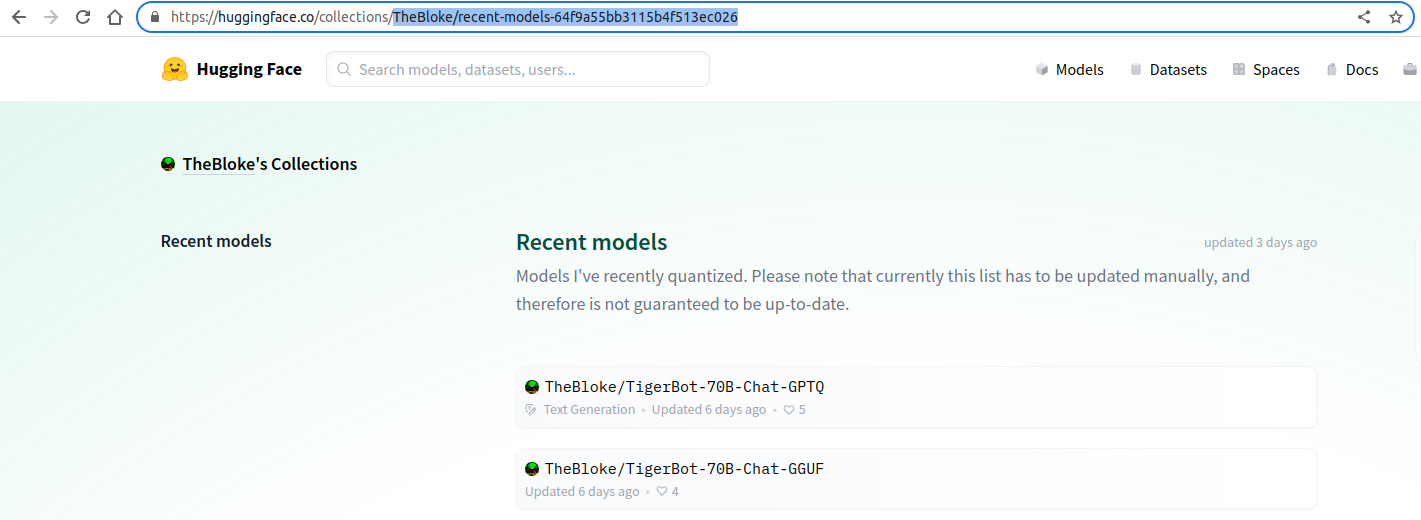
Let's fetch the collection with, "TheBloke/recent-models-64f9a55bb3115b4f513ec026":
>>> from huggingface_hub import get_collection
>>> collection = get_collection("TheBloke/recent-models-64f9a55bb3115b4f513ec026")
>>> collection
Collection(
  slug='TheBloke/recent-models-64f9a55bb3115b4f513ec026',
  title='Recent models',
  owner='TheBloke',
  items=[...],
  last_updated=datetime.datetime(2023, 10, 2, 22, 56, 48, 632000, tzinfo=datetime.timezone.utc),
  position=1,
  private=False,
  theme='green',
  upvotes=90,
  description="Models I've recently quantized. Please note that currently this list has to be updated manually, and therefore is not guaranteed to be up-to-date."
)
>>> collection.items[0]
CollectionItem(
  item_object_id='651446103cd773a050bf64c2',
  item_id='TheBloke/U-Amethyst-20B-AWQ',
  item_type='model',
  position=88,
  note=None
)
The [Collection] object returned by [get_collection] contains:
- high-level metadata:
slug,owner,title,description, etc. - a list of [
CollectionItem] objects; each item represents a model, a dataset, a Space, or a paper.
All collection items are guaranteed to have:
- a unique
item_object_id: this is the id of the collection item in the database - an
item_id: this is the id on the Hub of the underlying item (model, dataset, Space, paper); it is not necessarily unique, and only theitem_id/item_typepair is unique - an
item_type: model, dataset, Space, paper - the
positionof the item in the collection, which can be updated to reorganize your collection (see [update_collection_item] below)
A note can also be attached to the item. This is useful to add additional information about the item (a comment, a link to a blog post, etc.). The attribute still has a None value if an item doesn't have a note.
In addition to these base attributes, returned items can have additional attributes depending on their type: author, private, lastModified, gated, title, likes, upvotes, etc. None of these attributes are guaranteed to be returned.
We can also retrieve collections using [list_collections]. Collections can be filtered using some parameters. Let's list all the collections from the user teknium.
>>> from huggingface_hub import list_collections

>>> collections = list_collections(owner="teknium")
This returns an iterable of Collection objects. We can iterate over them to print, for example, the number of upvotes for each collection.
>>> for collection in collections:
...   print("Number of upvotes:", collection.upvotes)
Number of upvotes: 1
Number of upvotes: 5
Warning
When listing collections, the item list per collection is truncated to 4 items maximum. To retrieve all items from a collection, you must use [get_collection].
It is possible to do more advanced filtering. Let's get all collections containing the model TheBloke/OpenHermes-2.5-Mistral-7B-GGUF, sorted by trending, and limit the count to 5.
>>> collections = list_collections(item="models/TheBloke/OpenHermes-2.5-Mistral-7B-GGUF", sort="trending", limit=5):
>>> for collection in collections:
...   print(collection.slug)
teknium/quantized-models-6544690bb978e0b0f7328748
AmeerH/function-calling-65560a2565d7a6ef568527af
PostArchitekt/7bz-65479bb8c194936469697d8c
gnomealone/need-to-test-652007226c6ce4cdacf9c233
Crataco/favorite-7b-models-651944072b4fffcb41f8b568
Parameter sort must be one of "last_modified", "trending" or "upvotes". Parameter item accepts any particular item. For example:
"models/teknium/OpenHermes-2.5-Mistral-7B""spaces/julien-c/open-gpt-rhyming-robot""datasets/squad""papers/2311.12983"
For more details, please check out [list_collections] reference.
Now that we know how to get a [Collection], let's create our own! Use [create_collection] with a title and description. To create a collection on an organization page, pass namespace="my-cool-org" when creating the collection. Finally, you can also create private collections by passing private=True.
>>> from huggingface_hub import create_collection

>>> collection = create_collection(
...     title="ICCV 2023",
...     description="Portfolio of models, papers and demos I presented at ICCV 2023",
... )
It will return a [Collection] object with the high-level metadata (title, description, owner, etc.) and an empty list of items. You will now be able to refer to this collection using its slug.
>>> collection.slug
'owner/iccv-2023-15e23b46cb98efca45'
>>> collection.title
"ICCV 2023"
>>> collection.owner
"username"
>>> collection.url
'https://huggingface.co/collections/owner/iccv-2023-15e23b46cb98efca45'Once a collection is created, you can update its metadata using [update_collection_metadata]. You can change the title, description, visibility, position, and theme:
>>> from huggingface_hub import update_collection_metadata
>>> collection = update_collection_metadata(
...     collection_slug="username/iccv-2023-64f9a55bb3115b4f513ec026",
...     title="ICCV Oct. 2023",
...     description="Portfolio of models, datasets, papers and demos I presented at ICCV Oct. 2023",
...     private=False,
...     theme="pink",
... )
>>> collection.slug
"username/iccv-oct-2023-64f9a55bb3115b4f513ec026"
# ^collection slug got updated but not the trailing ID
Tip
Changing the title will update the slug of the collection, but the trailing ID will remain the same. Your existing links will keep working since the Hub resolves collections by the trailing ID.
Now that we have a [Collection], we want to add items to it and organize them.
Items have to be added one by one using [add_collection_item]. You only need to know the collection_slug, item_id and item_type. Optionally, you can also add a note to the item (500 characters maximum).
>>> from huggingface_hub import create_collection, add_collection_item

>>> collection = create_collection(title="OS Week Highlights - Sept 18 - 24", namespace="osanseviero")
>>> collection.slug
"osanseviero/os-week-highlights-sept-18-24-650bfed7f795a59f491afb80"

>>> add_collection_item(collection.slug, item_id="coqui/xtts", item_type="space")
>>> add_collection_item(
...     collection.slug,
...     item_id="warp-ai/wuerstchen",
...     item_type="model",
...     note="Würstchen is a new fast and efficient high resolution text-to-image architecture and model"
... )
>>> add_collection_item(collection.slug, item_id="lmsys/lmsys-chat-1m", item_type="dataset")
>>> add_collection_item(collection.slug, item_id="warp-ai/wuerstchen", item_type="space") # same item_id, different item_type
If an item already exists in a collection (same item_id/item_type pair), an HTTP 409 error will be raised. You can choose to ignore this error by setting exists_ok=True.
You can modify an existing item to add or modify the note attached to it using [update_collection_item]. Let's reuse the example above:
>>> from huggingface_hub import get_collection, update_collection_item

# Fetch collection with newly added items
>>> collection_slug = "osanseviero/os-week-highlights-sept-18-24-650bfed7f795a59f491afb80"
>>> collection = get_collection(collection_slug)

# Add note the `lmsys-chat-1m` dataset
>>> update_collection_item(
...     collection_slug=collection_slug,
...     item_object_id=collection.items[2].item_object_id,
...     note="This dataset contains one million real-world conversations with 25 state-of-the-art LLMs.",
... )Items in a collection are ordered. The order is determined by the position attribute of each item. By default, items are ordered by appending new items at the end of the collection. You can update the order using [update_collection_item] the same way you would add a note.
Let's reuse our example above:
>>> from huggingface_hub import get_collection, update_collection_item

# Fetch collection
>>> collection_slug = "osanseviero/os-week-highlights-sept-18-24-650bfed7f795a59f491afb80"
>>> collection = get_collection(collection_slug)

# Reorder to place the two `Wuerstchen` items together
>>> update_collection_item(
...     collection_slug=collection_slug,
...     item_object_id=collection.items[3].item_object_id,
...     position=2,
... )Finally, you can also remove an item using [delete_collection_item].
>>> from huggingface_hub import get_collection, update_collection_item

# Fetch collection
>>> collection_slug = "osanseviero/os-week-highlights-sept-18-24-650bfed7f795a59f491afb80"
>>> collection = get_collection(collection_slug)

# Remove `coqui/xtts` Space from the list
>>> delete_collection_item(collection_slug=collection_slug, item_object_id=collection.items[0].item_object_id)A collection can be deleted using [delete_collection].
Warning
This is a non-revertible action. A deleted collection cannot be restored.
>>> from huggingface_hub import delete_collection
>>> collection = delete_collection("username/useless-collection-64f9a55bb3115b4f513ec026", missing_ok=True)All of the above operations are also available from the hf command-line interface:
# List collections
>>> hf collections ls
>>> hf collections ls --owner nvidia
>>> hf collections ls --item models/teknium/OpenHermes-2.5-Mistral-7B --limit 10

# Get info about a collection
>>> hf collections info username/my-collection-slug

# Create a collection
>>> hf collections create "My Models"
>>> hf collections create "My Models" --description "A collection of my favorite models" --private

# Update a collection's metadata
>>> hf collections update username/my-collection --title "New Title"
>>> hf collections update username/my-collection --private --theme green

# Add an item to a collection
>>> hf collections add-item username/my-collection moonshotai/kimi-k2 model
>>> hf collections add-item username/my-collection Qwen/DeepPlanning dataset --note "Useful dataset"

# Update an item's note or position
>>> hf collections update-item username/my-collection ITEM_OBJECT_ID --note "Updated note"
>>> hf collections update-item username/my-collection ITEM_OBJECT_ID --position 0

# Delete an item from a collection
>>> hf collections delete-item username/my-collection ITEM_OBJECT_ID

# Delete a collection
>>> hf collections delete username/my-collection
>>> hf collections delete username/my-collection --missing-ok
Use --format json for machine-readable output. For the full list of options, run hf collections <command> --help. For more details, see the CLI guide.